What We Learned From Building an AI agent for 40 Million Developers

Agent Mode is your portal to working with Postman in an AI-native way – across testing, documentation, discovery, and now – implementation.
When we started building Agent Mode in Postman, we assumed the hardest problems would be model quality and prompt design. That turned out to be inaccurate. Most of the real challenges came from integrating an agent into a large, mature product—one with years of UX-driven assumptions, a wide surface area, and deeply specialized concepts. Agent Mode didn’t just expose limitations in language models; it surfaced structural assumptions in our APIs, our UX, and how product knowledge is distributed across the system.
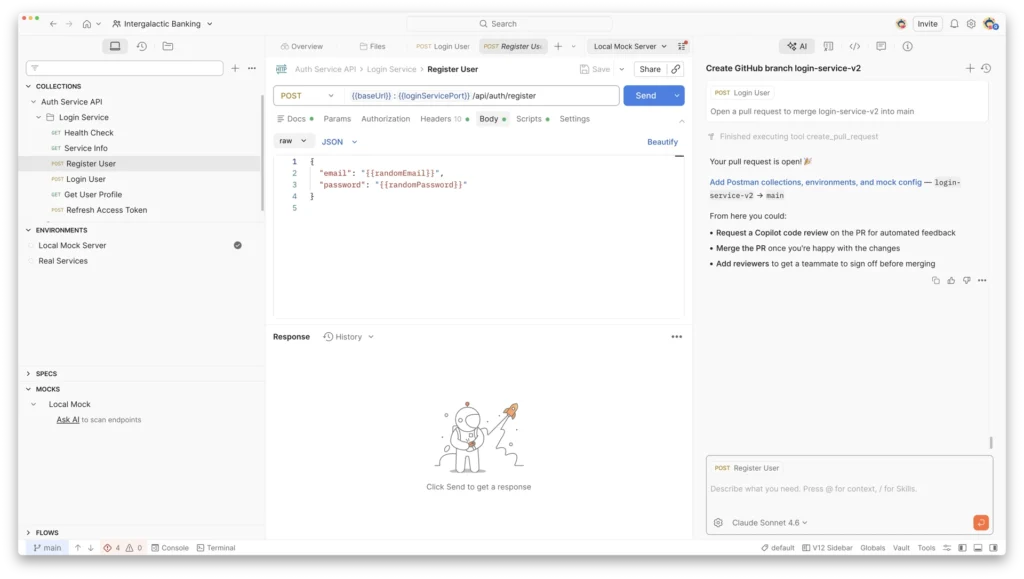
This post is a reflection on what we built, what broke, and the design decisions that emerged as we tried to make Postman legible to something that reasons instead of clicks.
Handling tool sprawl
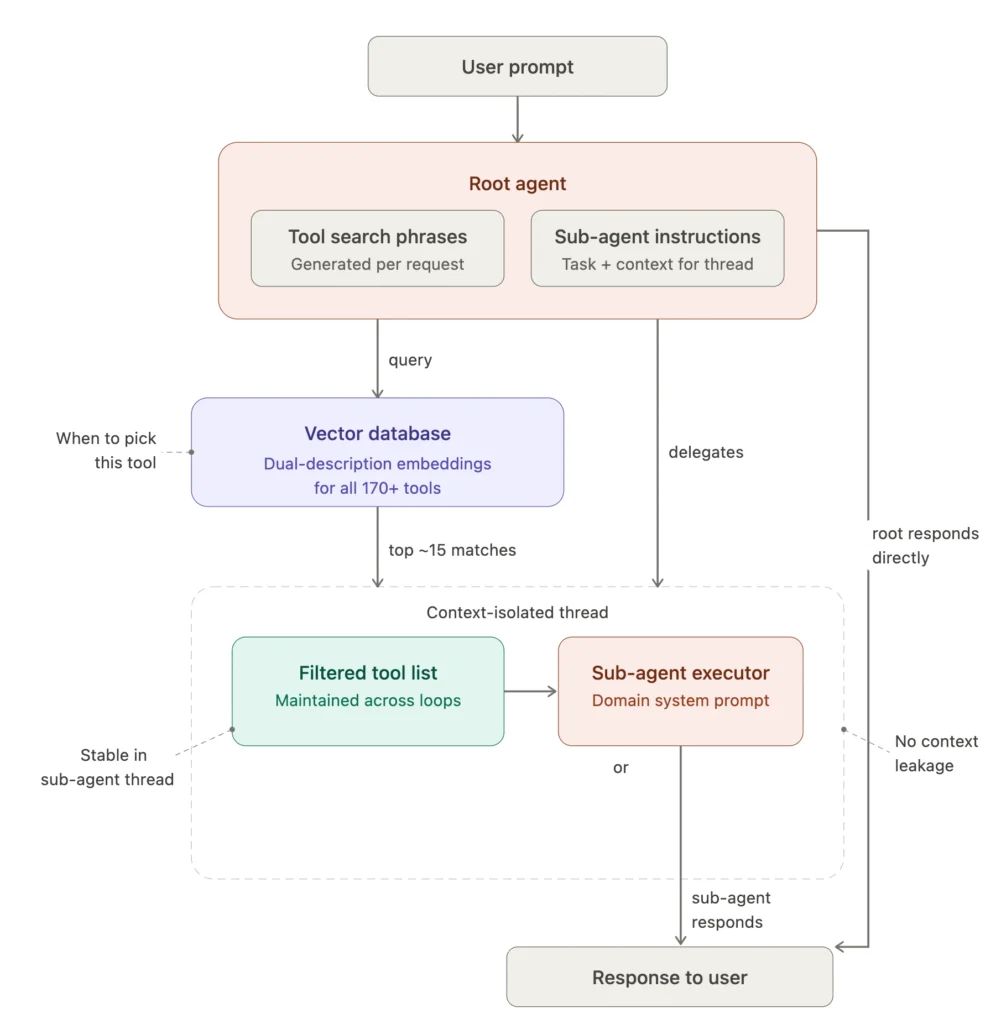
In Agent Mode, tools define how the agent acts inside Postman. Early on, we leaned toward highly atomic tools – small, precise actions like opening a request, updating a single field, or fetching a specific piece of metadata. That approach ensured correctness and control in early Agent Mode iterations but revealed several problems.
Many real-world workflows require long sequences of tool calls. Even when each step was fast, the overall experience felt slow because each action had to return to the LLM. Users saw the agent step through actions they had mentally grouped as one operation.
We also noticed a sharp rise in tool hallucinations once the toolset exceeded about 40 tools. The agent would call nonexistent tools, pass incorrect arguments despite valid schemas, or select tools that seemed semantically reasonable but were wrong in context. Larger or newer models reduced this, but didn’t eliminate it.
The current architecture selects tools based on need and context and isolates individual execution threads.
Perhaps the most surprising problem was how many of our client APIs were implicitly coupled to UI state – tools to modify requests needed certain UI elements to be open. Other tools would open new tabs as side effects. The agent was forced to open a request tab just to read it, mimicking mouse clicks instead of reasoning about data. We’re actively decoupling tools from tabs – Postman’s new Native Git feature makes extensive use of this. For example, Agent Mode can send requests in the background without an open tab (user approval is still required).
Exposing schema-based reads
For products like the API Catalog that surface a lot of structured data (service uptime, test results, endpoint response times) across a variety of services, our tools consolidate multiple views into a single Clickhouse query tool. The agent, given the schemas of Clickhouse tables, can generate complex queries with join and where clauses that can greatly reduce the number of distinct tools required to answer an analysis question:
SELECT toString(service_id) as service_id, countMerge(total_events_state) as total_requests,
 countMerge(error_events_state) as total_errors,
 round(countMerge(error_events_state) * 100.0 / countMerge(total_events_state), 4) as error_rate_pct,
 avgMerge(avg_latency_state) as avg_latency_ms,
 quantileMerge(0.95)(p95_latency_state) as p95_latency_ms
 FROM http_events_summary_1d WHERE
 service_id IN ('...list of service IDs') AND
 bucket_1d >= today() - 7
 GROUP BY service_id
 HAVING p95_latency_ms < 100
 AND total_requests > 0
 ORDER BY error_rate_pct DESC
With this approach, our job shifts to modeling data the right way, and the agent can generate a much wider variety of queries that we can create individual tools for.
Context Was the Real Bottleneck
We initially assumed missing tools would be the biggest blocker. In practice, missing or incomplete context caused more failures than missing capabilities.
Context represents the agent’s understanding of where the user is in Postman, which entities are active, and what state has already been established. When that context was wrong or absent, even correct tools became ineffective.
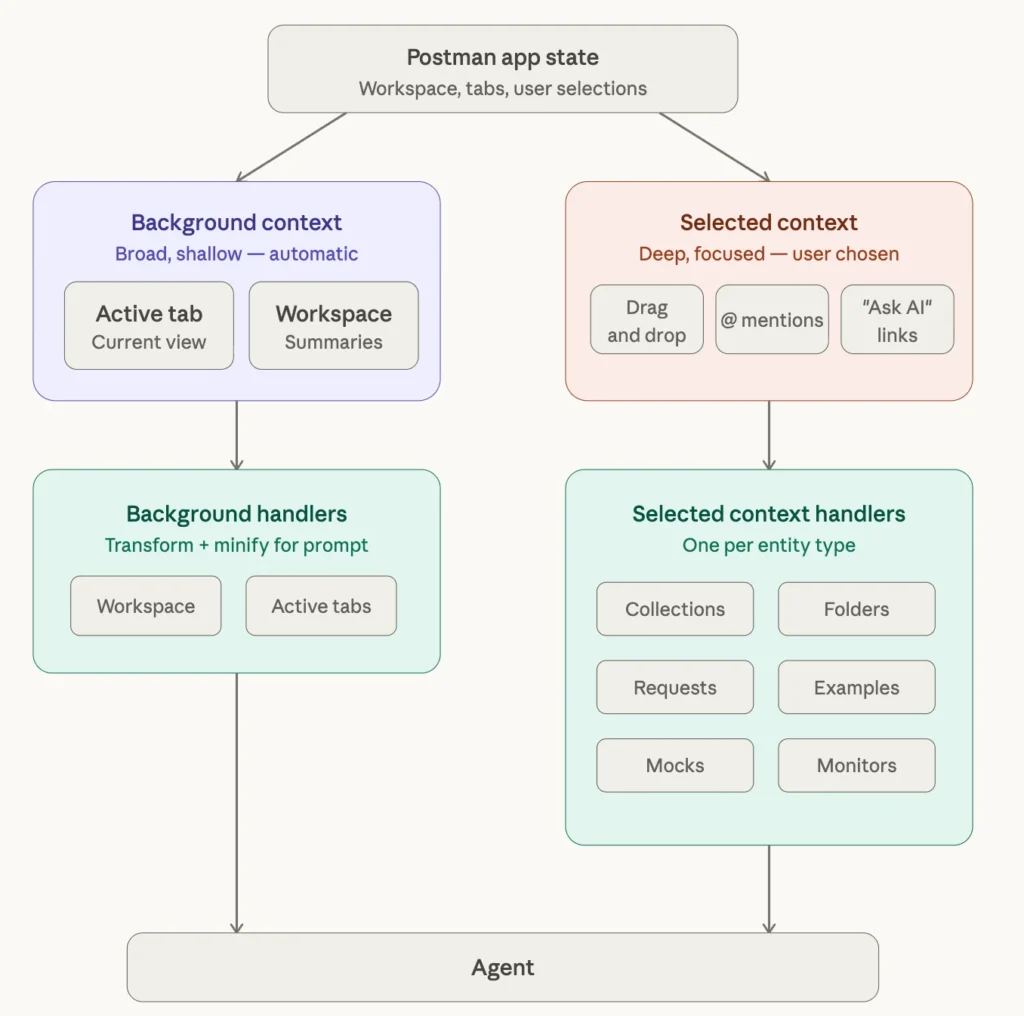
The challenge was structural: Postman has been built over 11 years, and both we as developers and our users have learned to find information through the UI – expanding sidebars, checking tabs. Re-engineering that awareness for an agent required multiple iterations. We had to re-examine what information was actually important for each workflow and what was noise. Simply calling JSON.stringify on existing UI data model would clearly not produce useful context—those objects were shaped for rendering and data transfer, not reasoning. We built dedicated context handlers that distilled each entity into what the agent actually needed to know.
As more objects in Postman started getting their own handlers, truncation became the next problem. Multiple fields hold user-generated data – request descriptions, OpenAPI specs, and request payloads – all have the potential to clog up the context window. This is a strong argument in favor of the filesystem approach described below, where custom truncation/expansion logic needn’t be written per handler.
Putting it all together
As Agent Mode evolved, it became clear that the system had to aggregate three distinct components, each solving a different problem.
The first was client-side tools, which live in the Postman application and represent the final actions the agent can take—opening requests, modifying settings, running collections, inspecting auth, and so on. Agent Mode uses server-side tools as well (for things like web search or managing agent loop flow), but the majority of tools operate on the Postman application.
The second was generic agent instructions—system-level instructions defining how Agent Mode behaves: how proactive it should be, how it communicates uncertainty, and what baseline knowledge it has about the product.
The third was a knowledge base, implemented using a RAG-based approach. Postman has a large product surface: multiple request protocols, mock servers, monitors, documentation, the API Network, workspace governance, variables at multiple scopes, helpers, code generation, request settings, and collection runs. Encoding all of this into static prompts wasn’t feasible, and most of it would be irrelevant for any given query.
For the initial seeding, we pointed Claude at our Learning Center and had it generate feature-specific articles—short enough that they didn’t need to be split into chunks. At runtime, the set of knowledge articles loaded into the agent context is selected based on the incoming user query plus available context. If a user has a mock server selected, the mock server article is automatically injected into the agent’s context window. This keeps the agent lightweight by default while allowing depth when needed. We’re now working on evolving the knowledge base in lockstep with the Postman app itself—as new features ship, the knowledge base needs to update alongside them. This lets teams “ship” the documentation for Agent Mode as they ship their feature.
Building Agent Mode forced us to confront the gap between what LLMs are good at and what real products actually look like: messy UX assumptions, coupled clients, sprawling tools, and knowledge scattered across docs and teams. We’re running multiple experiments in parallel: using files to represent state, treating code as the way to define and execute workflows, and rebuilding existing features from an agent-first lens instead of a human-first lens.
Get started with Agent Mode today
All of these features (and more) are available in Postman, and you can check out our documentation to read more about how they work.
New to Postman? Sign up and start building.






What do you think about this topic? Tell us in a comment below.