
From API Calls to Agent Calls: What I Learned Running a Live MCP Workshop at API Days Singapore

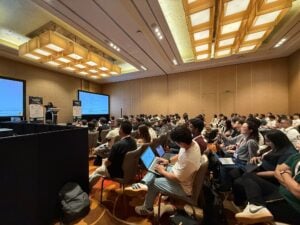
A full room. Over 150 developers, architects, and API practitioners gathered at the Marina Bay Sands Convention Centre – one of Singapore’s most iconic venues. Fifty minutes. One live Artemis mission to the Moon.
That was the setup for my workshop at API Days Singapore – and honestly, it exceeded every expectation I had walking in.
This post is a technical recap of what we built, what surprised the audience, and why I think we’re standing at a genuine inflection point in how APIs get consumed.
Follow Along
Everything from the workshop is public. Fork the collection into your Postman workspace and try each Agent Mode prompt directly as you read through the post.
The Problem I Wanted to Solve
Talk to most API developers and you’ll find the same pattern: enormous effort goes into designing and documenting the API itself, and then everything around it – testing, chaining requests, saving environment variables, generating docs – gets done manually. Every time. By hand.
It’s not that the tooling doesn’t exist. It’s that there hasn’t been a layer that understands intent – one that can take “register a crew member and save the API key for subsequent requests” and turn that into working code without you writing a single line of it.
Postman Agent Mode is that layer. You describe what you need in plain English, and Agent Mode handles the implementation – scripts, environments, documentation, test suites. And MCP (Model Context Protocol) takes it further still, to the point where the human calling the API can be replaced entirely by an AI agent acting on natural language instructions.
That was the thesis of this workshop. Not just “look at this cool feature.” But: we are at the inflection point where APIs stop being called by humans and start being called by agents. And your API workflow should reflect that today.
The Setup: Artemis Mission Control
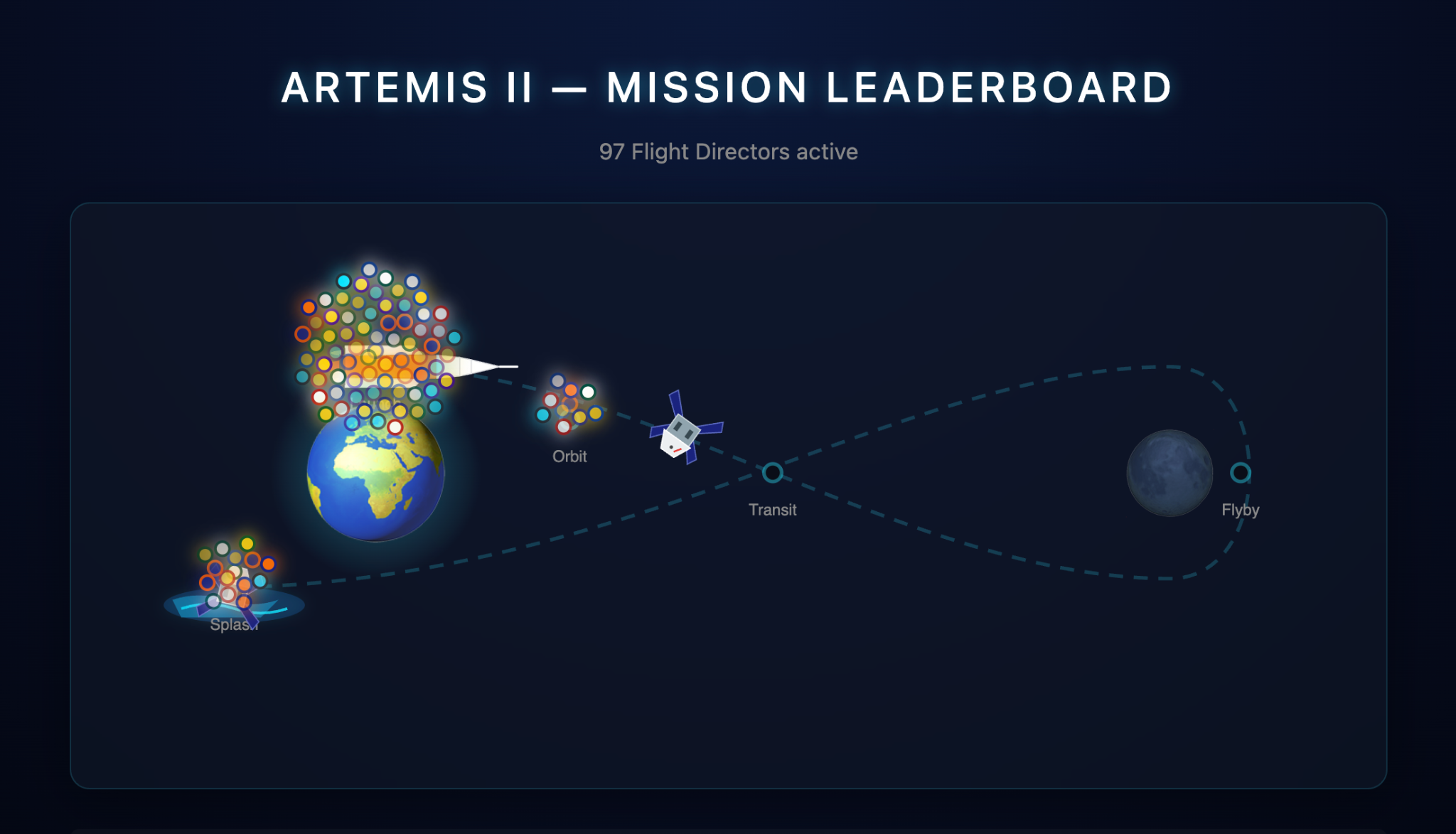
I built a purpose-designed workshop API called Artemis Mission Control – a mission logging system for a fictional lunar crew with enough complexity to feel real.
The API had enough complexity to feel real:
- Crew registration with API key issuance
- Mission log creation across phases (pre-launch, transit, lunar-approach, orbit)
- State progression — logs advance a rocket trajectory toward splashdown
- A leaderboard tracking participant progress in real time
- Business logic edge cases (anomaly logs that can never be deleted)
Every attendee got their own callsign, their own API key, and their own mission record that persisted beyond the session. The leaderboard was live throughout – which quietly created a competitive energy in the room that I hadn’t fully anticipated.
The full OpenAPI spec was published, and participants imported it directly into Postman to generate their collection. That alone took under a minute. Which set the tone for everything that followed.
What We Built, Step by Step
1. Git-Native API Workflow
We started with something deceptively simple: importing an OpenAPI spec and letting Postman generate the collection automatically.
For a portion of the room, this was already new. A non-trivial number of attendees had been manually creating collections request by request. Seeing the spec-to-collection import land in seconds was the first moment where I noticed people leaning forward.
From there, we set up environments using Agent Mode – one prompt, environment created, variables populated. No clicking through dialogs.
2. Agent Mode: The Feature That Changed the Room
This is where the energy shifted noticeably.
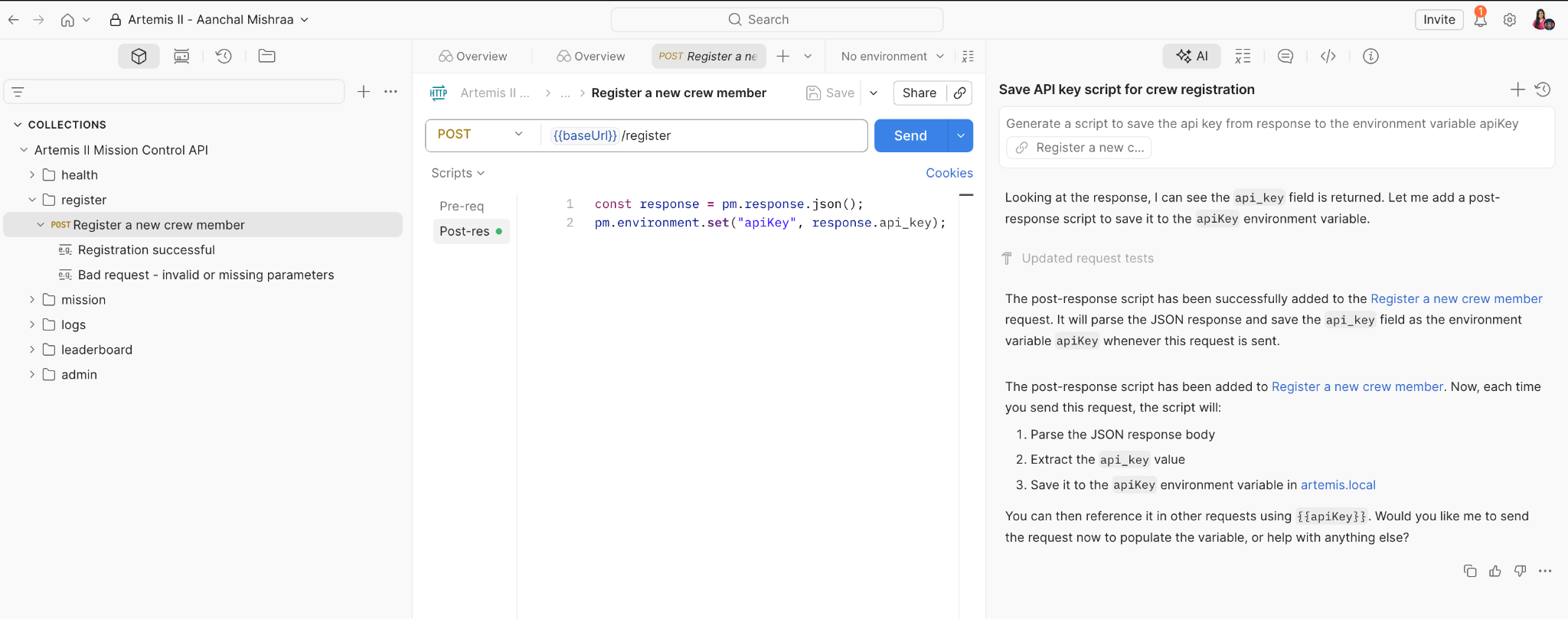
The task: after registering as a crew member, automatically extract the api_key from the response and save it to the apiKey environment variable – so every subsequent request would be authenticated without manual copy-pasting.
The traditional approach: write a post-response script in the Tests tab. Know the Postman scripting API. Know how to parse pm.response.json(). Know where to call pm.environment.set().
The Agent Mode approach:
- Generate a script to save the api key from response to the environment variable apiKey
- Agent Mode generated the complete script, added it to the correct request, and it worked on the next send.
What struck me watching the room: people weren’t just impressed by the output. They were recalibrating their mental model of what the tool was. Several attendees came up afterward and said they’d been using Postman for years and had no idea Agent Mode existed. That gap between what a tool can do and what its users know it can do – that’s a real problem worth naming.
The same pattern repeated across the session:
- Auto-generating collection documentation from the spec – one prompt, every request documented with descriptions, parameters, and example payloads, running in the background while we kept working
- Generating an end-to-end integration test collection – a fully chained sequence from registration through mission completion, with environment variables passed between requests
- Adding integration tests to that collection after the fact, iterating on failures in the same chat
Each of these tasks has a “manual” equivalent that takes significant time. Agent Mode compressed each one to a single prompt.
3. Visualization: Turning JSON Into a Mission Dashboard
If Agent Mode was the headline act, the Visualize tab was the unexpected crowd favorite.
The prompt we used:
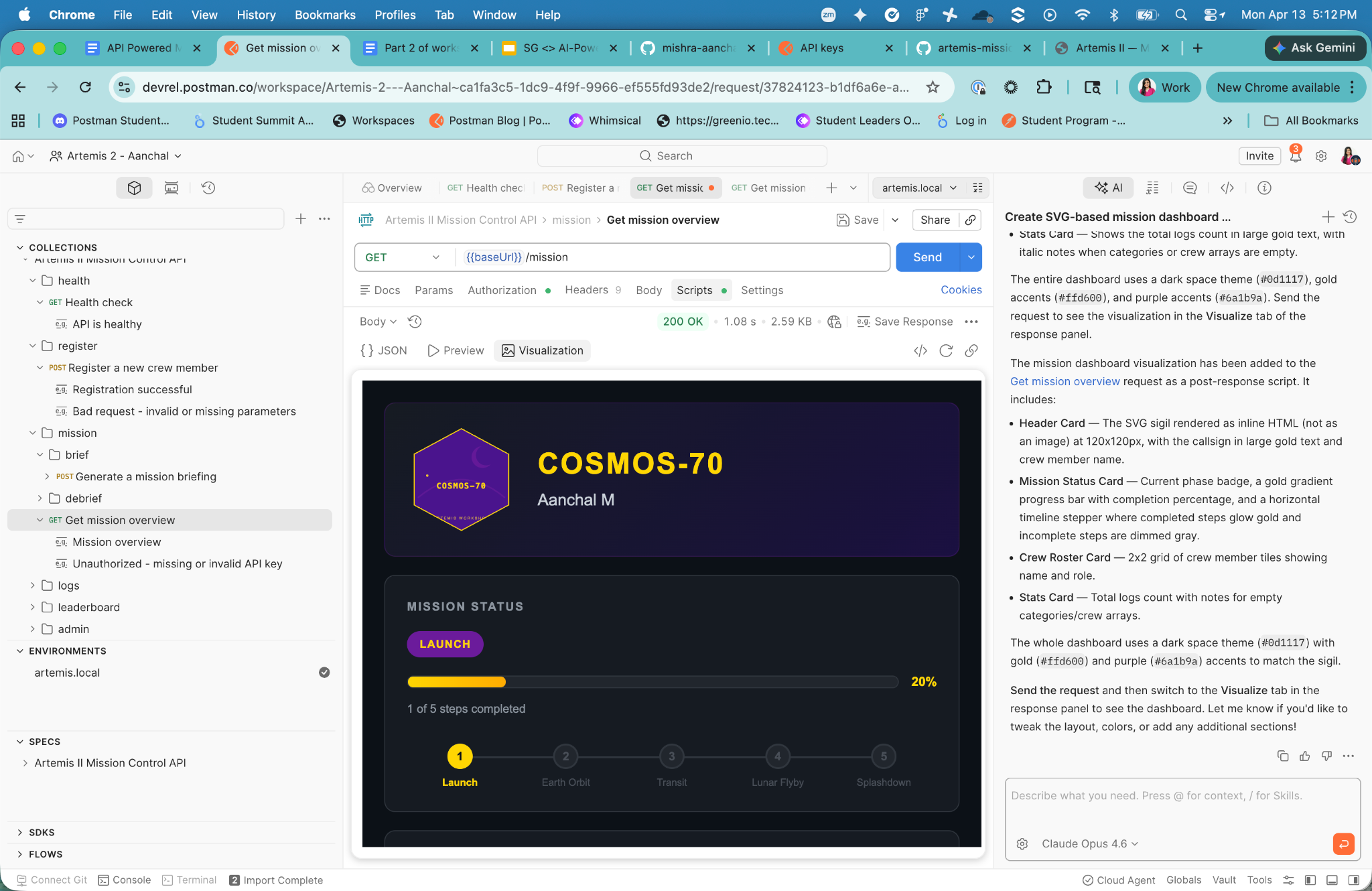
- Create a card-style visualization by rendering the SVG as HTML rather than an image.Keep all the fields in the card. Make it like a mission dashboard.
- What rendered in the Visualize tab: a styled mission dashboard showing callsign, a live SVG sigil badge, a mission progress bar, crew roster, and log statistics — all generated from the raw JSON response, entirely in-browser, no front-end setup.
The reaction in the room was immediate. People genuinely didn’t expect to see something that polished come out of a JSON response in Postman. It reframed what “API testing” can look like – less a grid of status codes, more a living view of what your API is actually doing.
4. MCP: When the Human Steps Out of the Loop
This was the final stage – and the one that I think has the longest tail for practicing developers.
MCP (Model Context Protocol) turns your Postman collection into a set of callable tools that an AI agent can invoke autonomously. The agent reads your collection, understands the endpoints, and executes them from natural language instructions – no human in the loop.
The live demo: Claude, connected via Postman’s MCP server, checking the Artemis leaderboard and summarising every participant’s mission progress – from a single natural language prompt, with no one clicking Send.
- The Prompt: Check the Artemis leaderboard from my Postman collection ID and tell me the status of all participants’ progress.
- The Result: The agent called the right endpoint, parsed the response, and returned a structured summary.
This is where I’d push back on anyone who frames MCP as a novelty. Think about what this means for production workflows:
- An AI agent can run your health checks and surface anomalies without a human initiating the call
- Incident response tooling can call your internal APIs based on alert conditions, not on-call engineers clicking through dashboards
- QA pipelines can be driven by natural language test specifications that get translated into real API calls
The collection is the interface. The agent is the caller. The human defines the intent and reviews the output. That’s a meaningful shift in how API-first development actually works.
What Genuinely Surprised Me
I knew the content was solid. What I didn’t fully anticipate was how many experienced developers in that room – people who use Postman daily – hadn’t encountered Agent Mode, the Visualize tab, or MCP integration.
There was a pattern: someone would watch a feature land, then immediately open their own Postman to try it. Not at the end of the session. Mid-demo.
That told me something important: the barrier to trying these features isn’t technical. It’s awareness. Nobody had shown them what was sitting inside the tool they already had open.
If you’re a developer reading this and you’ve never touched Agent Mode – that’s the gap I’m trying to close. Not because it’s impressive, but because it will change how long your actual work takes.
Try It Yourself
Everything from the workshop is public and available:
| Resource | Link |
|---|---|
| Artemis API Repository | https://github.com/Postman-Devrel/artemis-mission-control-api-workshop |
| OpenAPI Spec | openapi.yaml |
| Hosted API | artemis.up.railway.app |
| Meet Agent Mode | academy.postman.com/meet-agent-mode |
| Agent Mode Prompt Library | postman.com/templates/agent-mode/ |
| Postman MCP Server | github.com/postmanlabs/postman-mcp-server |
Import the spec, run the collection, and try the Agent Mode prompts from the workshop. The API is still live. Your callsign is waiting.
The Takeaway
A hundred and fifty developers walked into a room in Singapore. Most of them left with a different picture of what their API tooling could do – not in some future state, but right now, in the tool already open on their machines.
Agent Mode removes the last excuse for not automating your API workflow. And MCP removes the assumption that a human needs to be the one making the call at all.
We’re not heading toward agentic API workflows. We’re already there. The question is just whether your collections are ready for the agent that’s about to use them.
If you want to catch the next workshop or API Days, all upcoming events are on our Luma calendar.







What do you think about this topic? Tell us in a comment below.