September 2025 Product Update: Redesigned Variables, AI Requests in Collections, and Workflow Improvements

This month, we’re focusing on reducing confusion and improving security across your API development workflow. We’re excited to introduce a completely redesigned variables system that eliminates the guesswork about initial and current values and brings more transparency to sharing and unsharing. Plus, we’ve added several workflow improvements to make your daily API work more efficient.
Build, test, deploy, and monitor
Postman keeps specs, code, and tests in sync so teams prevent drift as they build, catch issues early with continuous testing, deploy with confidence, and monitor APIs after release to ensure reliability.
Configure variables with clarity
Managing variable security and sharing across teams and organizations can pose several challenges. Some variables, like API keys and tokens, need to stay local and private. However, shared assets such as environment endpoints and test data need to be accessible to the whole team. We hear you: the old variable system caused some confusion and security headaches. You had to parse some unclear fields, remember to save constantly, and if you placed sensitive values like API keys in the wrong field, they could accidentally sync to the cloud.
We’ve redesigned variables to work consistently across your entire API lifecycle. There’s now just one value per variable (no more initial vs. current) that behaves the same whether you’re building locally, testing with your team, or deploying to production. Variables are saved locally by default, keeping them private and not synced to the cloud. Users can still share, but only with explicit controls, so you can confidently move from development to staging to production without worrying about accidentally exposing sensitive data.
Control sharing by using toggle switches next to each variable, or use More > Share all to share in bulk. Mark variables as sensitive to mask values in the user interface, and Postman will warn you before accidentally sharing them. Variables now autosave and also support descriptions for better documentation. This overhaul is backward compatible, so your existing shared variables are still shared, but now you can unshare them if needed. Unshare individually using the toggle next to each variable, or in bulk by selecting More > Unshare all.
Learn more about simplified variables →
Build AI agents
Postman provides a single platform for agent development that takes you from prototype to production.
Build AI requests directly in collections
AI developers need to experiment with different models from OpenAI, Anthropic, Google, and others, but testing and evaluating these models typically happens in isolated environments outside your normal API workflow. When you want to give AI models context from your trusted data sources or internal APIs, the setup is all manual. There’s no unified way to organize, version, and collaborate on AI experiments alongside your regular API development work.
Postman now lets you create AI requests directly in your collections to interact with any AI model of your choice. You can experiment, test, and evaluate different models right alongside your regular APIs, then add MCP servers to give models context from your trusted data sources and internal APIs. Our MCP catalog system manages servers across public, internal, and private namespaces. Everything lives in your workspace, where your team can collaborate on AI experiments just like any other API project.
Additional improvements
This month, we’ve also shipped some updates that make Postman easier to use and extend in your coding environment:
-
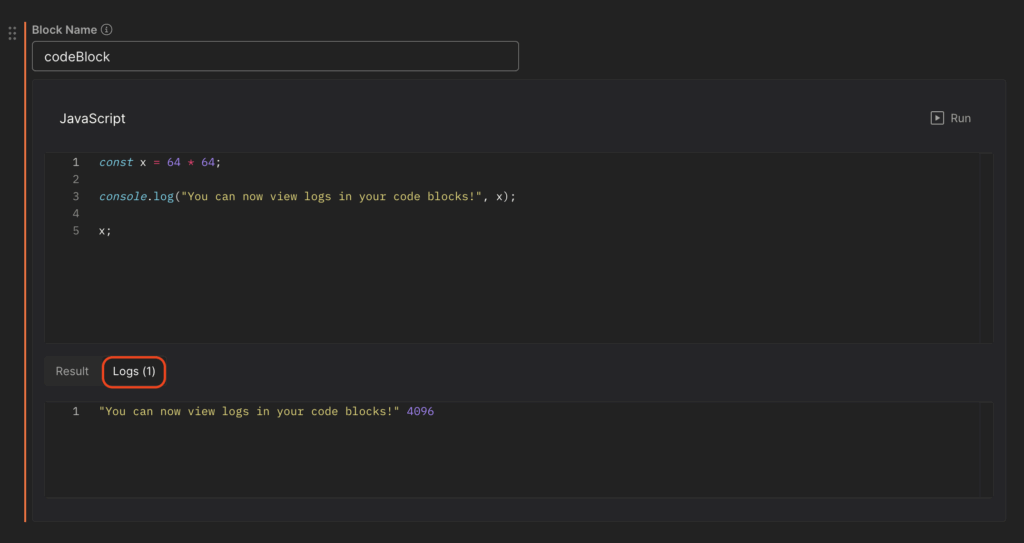
Notebooks enhancements: We’ve added logs for better debugging visibility, made it easier to refresh requests that have been updated in the collection, and launched a leaderboard with your favorite notebooks from the Notebook Creator Challenge.
-
VS Code MCP integration: Postman’s MCP server is available in the VS Code extension, letting you connect AI assistants directly to your Postman workflow from your editor. Access collections, environments, and Postman API tools without leaving your coding environment. Read the docs →
-
Postman MCP server on GitHub: Postman’s MCP server is now available on GitHub, making it easier to integrate Postman capabilities into any AI workflow. Choose between minimal (37 tools) or full (100+ tools) modes, with support for STDIO and Streamable HTTP protocols. Learn more and configure the integration →
Looking forward
API development moves quickly, and these updates are designed to help you stay in the loop, from clearer variable handling to AI integrations built into your workflow.
Head over to our community to see what others are saying about this month’s updates. Our team loves hearing from you, and your feedback shapes what we build next.
Keep it 200,
The Postman Team









What do you think about this topic? Tell us in a comment below.