
Announcing the Postman Plugin for Claude Code

We are excited to announce the availability of the Postman Plugin in Claude Code. The Postman Plugin for Claude Code connects your Postman workspace directly to Claude Code with a single, simple install.
To get started, run the following commands:
# Clone the plugin
git clone https://github.com/Postman-Devrel/postman-claude-code-plugin.git

# Set your API key (add to ~/.zshrc to persist)
export POSTMAN_API_KEY=PMAK-your-key-here

# Start Claude Code with the plugin loaded
cd your-api-project/
claude --plugin-dir /path/to/postman-claude-code-plugin
Then run /postman:setup to verify your connection and select a workspace. That’s it. If you need to obtain your Postman API keys, you can get them at postman.postman.co/settings/me/api-keys.
How It Works Under the Hood
When you load it with –plugin-dir, it bundles a .mcp.json file that auto-configures the Postman MCP Server. All 8 commands communicate through 111 MCP tools. No scripts, no runtimes, no package managers.
Three skills load automatically in the background:
- Postman Routing detects your intent and routes to the correct command
- Postman Knowledge provides domain expertise for choosing the right MCP tools
- Agent-Ready APIs brings knowledge about what makes APIs compatible with AI agents
You never interact with the skills directly. They make Claude smarter about Postman without you having to think about it.
Requirements: Claude Code v1.0.33 or later, and a Postman API key. That’s the complete list.
What You Can Actually Do With It
Rather than share a long feature list, here are a few real usage scenarios. These are prompts that you will use daily.
“My frontend team needs to start building before the API is done”
This happens all the time. The backend is still in progress, which means the frontend teams are blocked. Postman solves this via mock servers.
/postman:mockThe plugin reads your collection, generates example responses for endpoints that don’t have them, creates the mock server, and hands you the URL. Your frontend team can start building against realistic responses while the real API is still in flux.
“I changed a bunch of endpoints and need to update Postman”
You’ve been refactoring your API, and now your OpenAPI spec is out of sync with your Postman collection.
/postman:sync
The plugin detects your local spec, compares it against the existing collection, and updates what changed. New endpoints get added. Removed ones get flagged. Your collection stays current without manual copy-paste.
“Something’s failing in CI and I don’t know why”
Your collection tests are failing in the pipeline but passing locally.
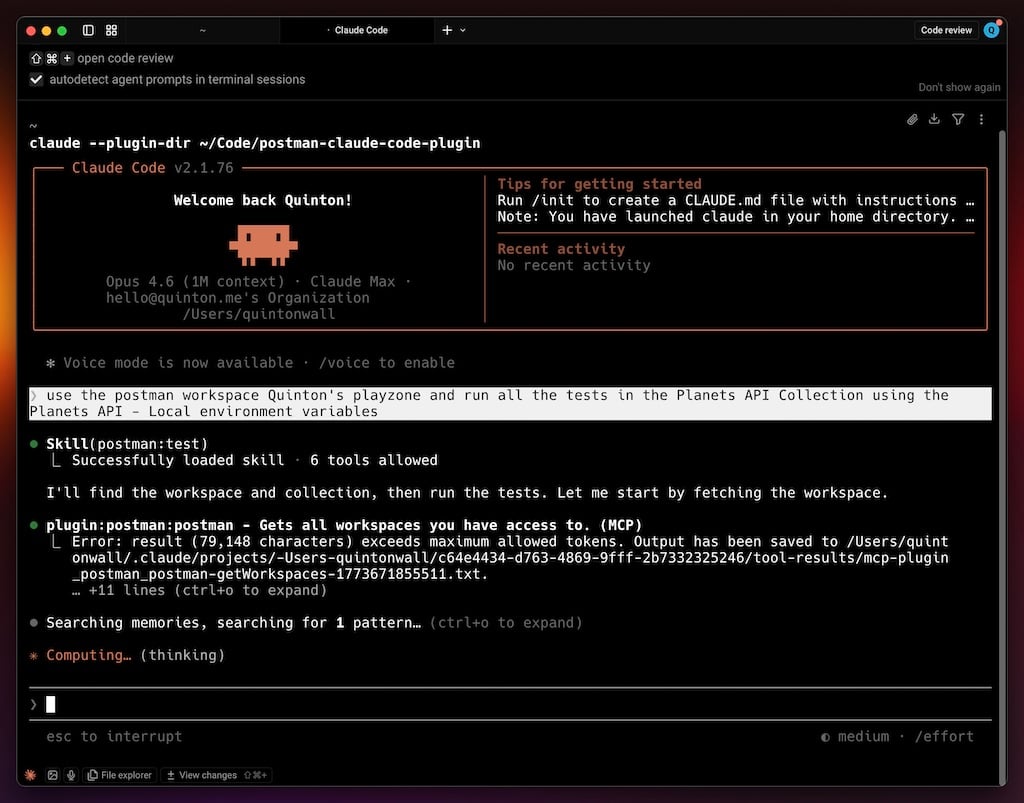
/postman:test
The plugin executes the collection, parses the results, identifies which requests failed, and suggests fixes. It has access to both your code and your Postman workspace. That means it can correlate test failures with recent code changes in ways a standalone test runner can’t.
“I need a TypeScript client for this internal API”
Let’s say someone on another team built an API, and you need to consume it. You could read their docs (if they exist) and write the client by hand. Or:
/postman:codegenThe plugin pulls the collection, detects your project language, and writes typed client code that matches the actual API contract. Not a generic HTTP wrapper. Real types, real method signatures, based on what the API actually returns.
“We’re exposing this API to partners, can you check the quality of the documentation?”
/postman:docs
The plugin audits your existing docs, identifies gaps (missing descriptions, undocumented parameters, no examples), and generates improvements. When you’re happy with it, it can publish directly.
“Are there any security issues I should worry about?”
/postman:securityThis will run twenty-plus checks including the OWASP API Top 10 coverage tests. Each finding is assigned a severity score and specific remediation guidance based on your API’s actual endpoints and auth configuration.
The Secret Weapon: API Readiness Analyzer
AI agents are calling APIs now. Claude can browse the web. Coding agents integrate with external services. Autonomous workflows chain multiple API calls together. But most APIs were built for humans who can read ambiguous error messages, guess at parameter formats, and check Slack when something breaks. Based upon the 90-Day AI Readiness Playbook, the API Readiness Analyzer walks through the full transformation from fragmented APIs to agent-compatible infrastructure. Just ask:
“Is my API ready for AI agents?”
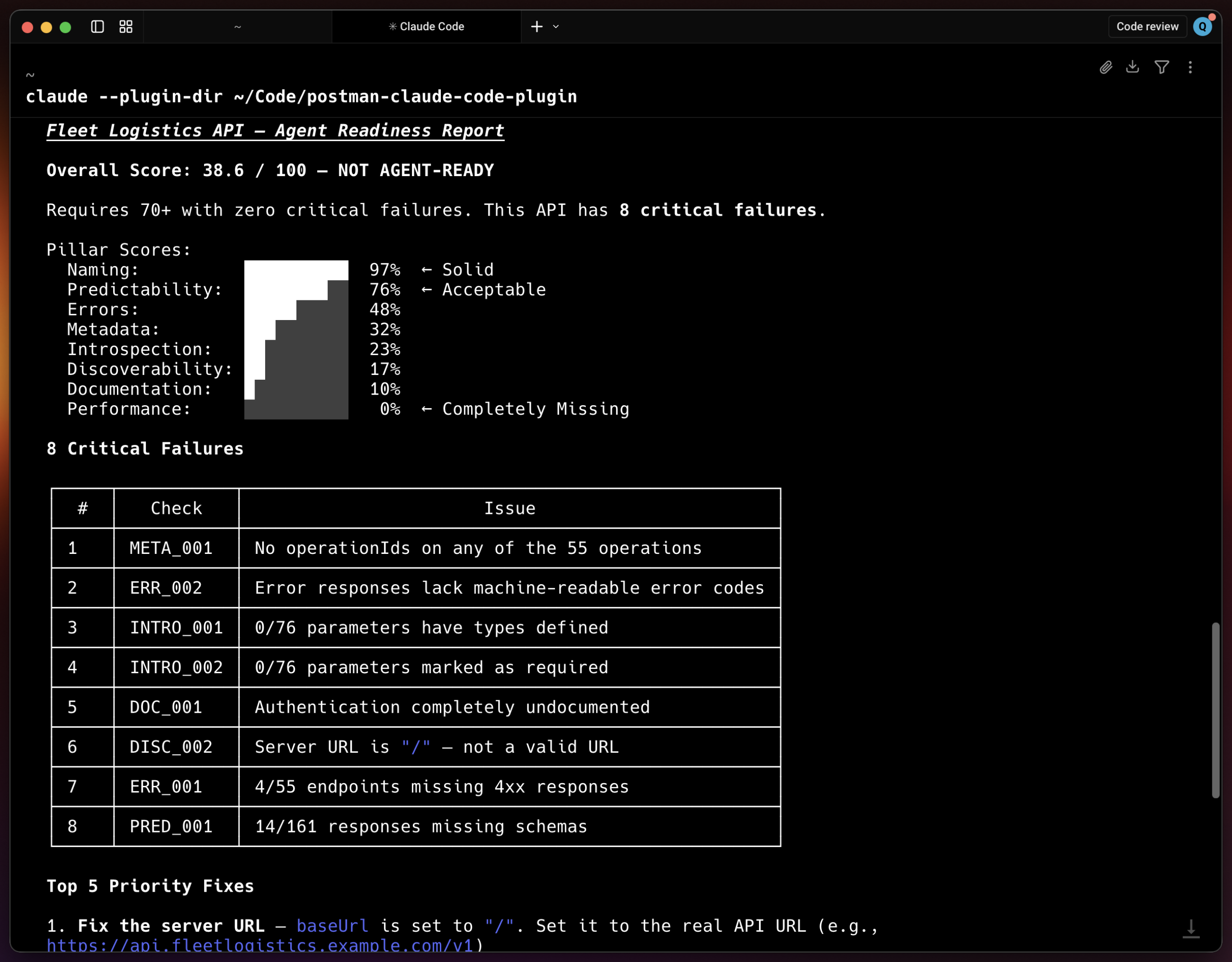
The readiness analyzer scores your API across 8 pillars with 48 individual checks:
- Metadata — operationIds, summaries, descriptions, tags
- Errors — Structured error schemas, codes, retry guidance
- Introspection — Parameter types, required fields, examples
- Naming — Consistent casing, RESTful path conventions
- Predictability — Response schemas, pagination, date formats
- Documentation — Auth docs, rate limit documentation
- Performance — Rate limit headers, caching, bulk endpoints
- Discoverability — OpenAPI version, server URLs, spec availability
Score 70% or above with no critical failures, and your API is agent-ready. Below that, the analyzer tells you exactly what to fix and ranks fixes by impact.
You Don’t Need to Remember Commands
The plugin ships with a routing skill that detects intent from natural language. You don’t need to memorize eight slash commands.
Say “sync my collection” and it routes to /postman:sync. Say “check for vulnerabilities” and it routes to /postman:security. Say “is my API agent-ready?” and it triggers the readiness analyzer.
What’s Next
The plugin is open source and actively developed. A few things on the near-term roadmap:
- Better team workspace support for larger organizations
- Postman Flows integration for workflow automation
- CI/CD helpers for pipeline integration
- More readiness checks covering API versioning and SDK generation
If you try it and something breaks, or you want a feature that doesn’t exist yet, open an issue. Let us know what you need.





What do you think about this topic? Tell us in a comment below.