Postman Product Update: January 2026

Developers are expected to ship faster than ever. But too often, that speed comes from shortcuts like skipped tests and late performance checks that create technical debt and slow teams down later.
This month’s updates focus on making speed sustainable. Validate behavior at scale, debug faster, and bring AI, issues, and collaboration into a single API-first workflow without switching tools.
Let’s dive in.
Test performance and correctness together
Most teams discover performance issues too late. Load testing typically happens after features ship, when changes are expensive. Existing tools are too heavy to run as part of everyday development. When performance testing does run, it usually focuses on metrics like latency and throughput without validating that API behavior remains correct under load.
But speed isn’t the same as correctness. APIs can pass functional tests and still fail in production due to race conditions, shared state, or resource contention. Response times can look healthy while behavior degrades for users.
Postman’s rebuilt performance testing engine makes it easier to catch issues earlier:
-
Generate higher and more predictable load without specialized infrastructure
-
Run your existing
pm.test()assertions at scale -
Validate correctness alongside latency and throughput with the same collections you already use for functional testing
You can see exactly when and where behavior changes as load increases. The rebuilt performance testing engine is rolling out now to all Postman app users, with Enterprise availability following shortly.
CI support for performance testing is now in open beta. You can run performance tests headlessly using the Postman CLI, reuse the same collections from local development through CI, and analyze results directly in Postman. Catch concurrency bugs earlier, reduce late-cycle rework, and ship APIs that behave predictably under real-world traffic.
Learn more about viewing test assertion results →
Debug with the Errors tab
When a collection run fails, it can be unclear what actually went wrong. Test failures, network issues, script errors, and timeouts all appear together in the logs, so you have to dig through the console output to figure out what actually broke.
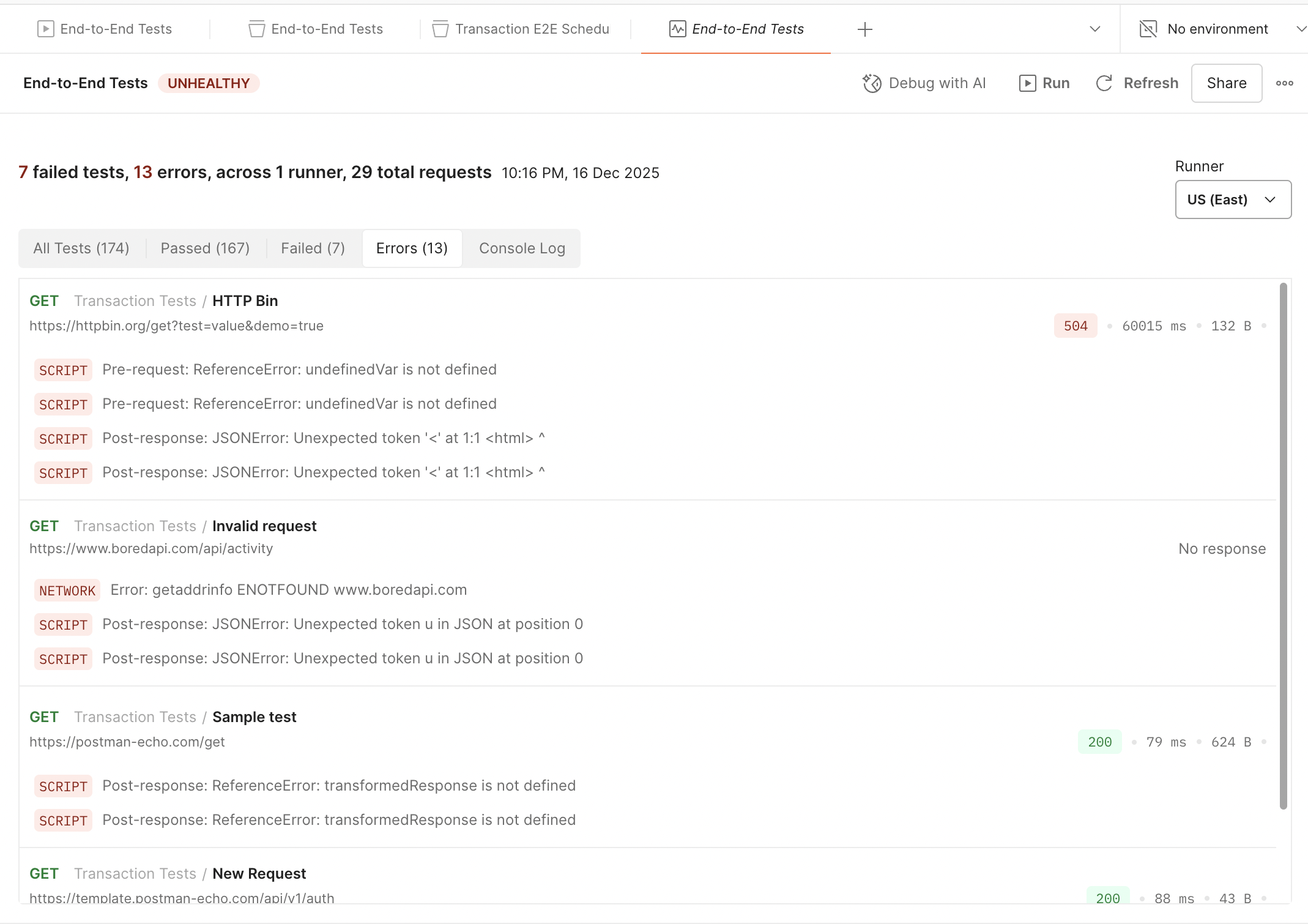
The new Errors tab makes debugging clearer across collection runs, monitors, and scheduled runs by separating failures from unexpected errors:
-
Failures show failed
pm.test()assertions -
Errors surface unexpected issues like network failures, script errors, and timeouts
-
Errors are grouped by request, with indicators showing whether they occurred in pre-request or post-response scripts
When you see a failure in the Errors tab, you can jump directly to the failing request and start debugging immediately.
Create Jira and GitHub issues with Agent Mode
Debugging often breaks the flow of work. Even when you find a problem quickly, you still have to switch tools to log issues and reconstruct context.
Agent Mode can now create Jira and GitHub issues directly from Postman. Relevant context is automatically carried over, reducing manual handoffs and helping teams move faster. You can also prompt Agent Mode to provide information about past issues for a request or workspace, giving you context for troubleshooting new problems.
Try this prompt in Agent Mode now →
Activity summaries for Slack and Microsoft Teams
Balancing signal and noise in API notifications can be difficult, and alert fatigue is real. Real-time notifications for every change can overwhelm channels, and manually checking Postman can make updates easy to miss.
Postman’s Slack and Microsoft Teams integrations now support curated summary-style notifications on a set schedule. Instead of individual alerts, summaries highlight what changed and when. You can customize delivery by day, time, and time zone. This is especially useful for teams who want to stay informed without noisy real-time notifications.
Learn more about Slack and Teams activity summaries →
Connect any AI model with BYOM
Experimenting with AI models often means switching platforms, juggling credentials, and adapting workflows to whatever the tooling supports instead of choosing the best model for the job. Testing new models, self-hosted deployments, or local LLMs usually requires separate setups and custom code.
AI requests in Postman bring AI experimentation into a single workflow:
-
Browse and switch between models using a redesigned provider and model selector
-
Connect any OpenAI-compatible endpoint with Bring Your Own Model (BYOM) support
-
Work with proprietary, self-hosted, or local deployments in the same place
Expanded authentication options support providers with custom or non-standard requirements. You can test, compare, and evaluate models directly in Postman Collections using the same workflows you already rely on, making it easier to adapt as models evolve while keeping AI work grounded.
Learn more about AI requests and BYOM →
Connect AI coding tools with Postman’s MCP server
AI coding agents are most effective when they understand the APIs they’re working with. Without context, they generate code that’s incomplete, incorrect, or disconnected from how your API really works.
Postman’s MCP server now gives AI agents structured, executable context about your APIs, enabling you to:
-
Run collections to test APIs and validate behavior
-
Generate idiomatic, well-structured code from internal or public API definitions
-
Keep AI output aligned with how your APIs actually work
You can connect MCP-compatible tools like Claude Desktop, Cursor, and VS Code to Postman’s MCP server. Use natural-language prompts such as “Generate TypeScript code from this collection,” “Create a new collection for the Stripe API,” or “Run this collection and analyze the results.”
Learn more about Postman’s MCP server →
Share API knowledge with Notebooks
Collaborate on interactive documentation with Team Notebooks
Sharing API knowledge often means static documentation that drifts out of date, or scattered Slack threads that lose context. Without runnable examples, developers spend time recreating workflows instead of learning by doing.
Team Notebooks are now generally available. With Team Notebooks, you can create collaborative, interactive API documentation that stays in sync with how APIs work, combining narrative guidance with runnable requests and code snippets.
Learn more about creating Notebooks →
Generate end-to-end Notebooks with Agent Mode
Creating comprehensive Notebooks manually can still take time. Agent Mode now helps generate Notebooks from natural-language prompts. Describe what you want to build, such as “integrate PayPal into a payment flow” or “build a Spotify playlist based on weather conditions,” and Agent Mode generates an end-to-end Notebook with explanations, requests, and runnable code.
You can refine or extend generated Notebooks using natural language, reducing friction for contributors and making it easier to publish high-quality content to the Postman API Network.
Additional improvements
We’ve also shipped several smaller improvements that streamline everyday work:
-
Create Jira issues directly from monitor results to flag failures, share context, and assign follow-up tasks. Failure details and timestamps are automatically carried over.
-
View console logs in collection runs. Console logs now appear directly within collection run results, matching the visibility already available in monitors and scheduled runs.
-
Sort requests in collections alphabetically. We addressed a highly-requested GitHub issue: you can now sort requests alphabetically (A–Z) for faster navigation and cleaner organization.
-
Manage spec-collection sync in Spec Hub. Control what syncs between specifications and collections. Keep examples independent or in sync, and adjust settings as your workflow evolves.
-
Postman CLI now supports Linux ARM64. The Postman CLI v1.27.0 now includes native support for Linux ARM64. ARM64 is increasingly common in CI environments and developer machines, but earlier versions of the Postman CLI required emulation or workarounds when running on Linux ARM64.

Looking forward
This month’s releases help you move faster without creating new risk. Performance testing that scales with real assertions, clearer debugging signals, more flexible AI experimentation, tighter integrations across CI and collaboration, and faster ways to share knowledge.
Together, these updates reduce late-cycle surprises and manual handoffs. You get earlier feedback, clearer signals, and more confidence that what works locally will hold up under real traffic.
Explore the new features, put them into your workflow, and share your feedback in the Postman Community.
Keep it 200,
The Postman Team








What do you think about this topic? Tell us in a comment below.