Introducing Code-Based Mocks in Postman

What’s new
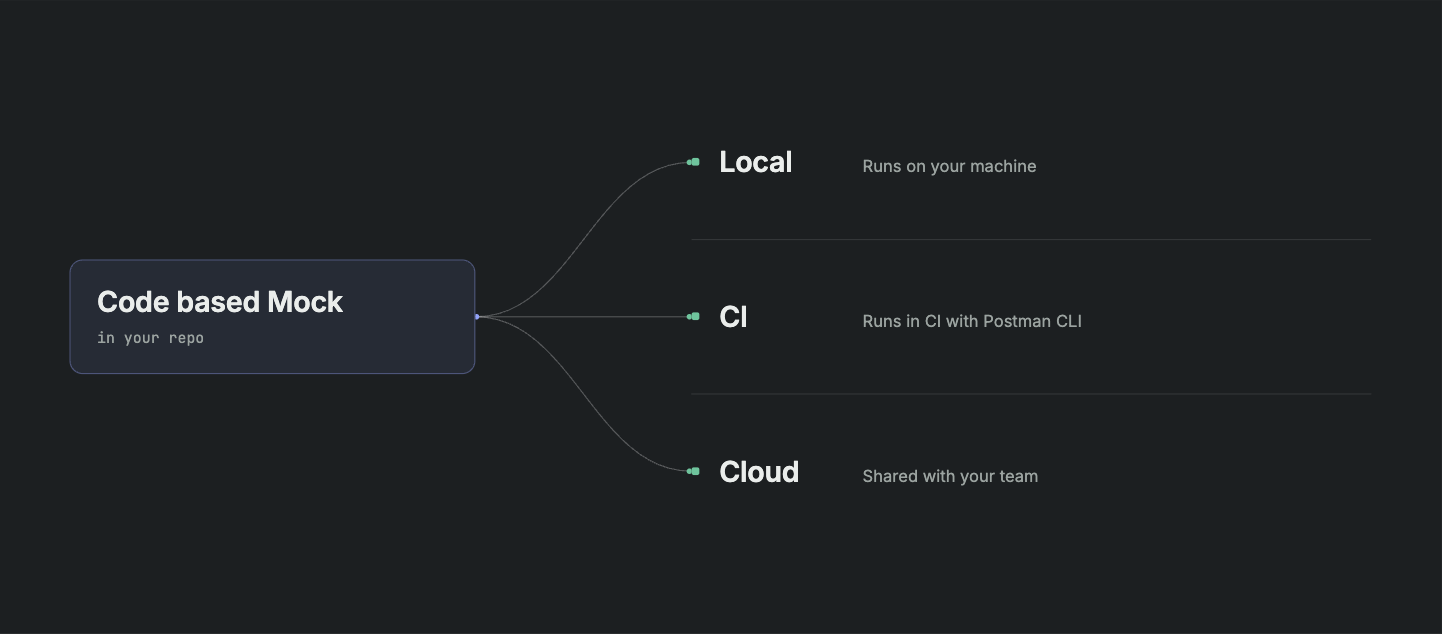
You can now write Postman Mock Servers in JavaScript. They remember things between requests. They run on your laptop, in CI, or in the cloud.
Every step is a terminal command. So your coding agent can do all of it: create the mock, run it, break it on purpose, and hand your CI a URL.
We call these code-based mocks.
The bottleneck removed
Agents build what you ask for in minutes. Ask for a shopping cart API and you have one right away.
So writing code is not the slow part anymore. The slow part is everything the code needs in order to work. The service that does not exist yet. The staging environment with a queue in front of it. The failure you cannot reproduce when you want to. The secret keys to the dependencies that your agent cannot access.
The bottleneck now is the tools we give to humans and agents. So we built one that runs at the speed of your thought.
Here is the everyday version of the problem. Two teams, one contract. Your agent writes the cart service in ten minutes. Then it sits three sprints behind a schema review, a database to provision, and a payment vendor that has not onboarded you yet. Meanwhile the application team is waiting on a URL you cannot give them.
With nothing running, the teams calling you work from a spec doc and a guess. The code compiles and tests pass, because the tests make the same guesses the code did. Things break when your service ships.
Pointing them at a real environment is not much better. Every test checkout decrements real inventory and calls a real payment provider. There are costs and rate limits. And you still cannot make a specific failure happen on demand.
What your agent needs is a safe place to practice. Something that acts like production without being production. Add an item to a cart, and the next read of that cart should show the item. Ask for a 429 on the third call, and get one every single time, so the agent can prove its retry code works.
A saved example answers one question: what does this endpoint return? When you build an integration, you need the answer to a different one: how does this service behave? That answer is logic. So we made mocks into programs.
A mock is a program
Three things follow from that.
- It remembers.
pm.statesaves and reads data across requests, withget,set,delete, andpush. The second request knows what the first one did. - An agent can write it. Code is the one thing you and your agent can both read, write, diff, and review. Postman Agent Mode is good at this, because it already has your specs, collections, and run history.
- It travels with your work. The same file runs on your laptop, in CI, and as a deployed mock server your team shares. Keep it in your repo with native git in Postman.
Before you start
You need the Postman desktop app or the Postman CLI. Download Postman or install the Postman CLI and connect your repository in a Postman workspace.
Install the CLI on macOS or Linux and log in:
curl -o- "https://dl-cli.pstmn.io/install/unix.sh" | sh
Or with npm:
npm install -g postman-cli
then:
postman loginBuilding with agents
I was building that cart service and this is what I asked my agent in that repository:
Build a cart service that adds an item, fetches the cart and checks out to confirm the order. It needs to persist state, so adding an item should change what the cart returns. Then make it fail the way the real one will, and give me a URL the application team and our CI can use.
Here is what came back. The agent ran every command itself while I read the diff. Of course, you can execute these via the Postman App or CLI.
1. It picked the right command
postman mock generate --name shopping-cart
This creates a local mock: a JavaScript file with a Node.js HTTP server.
You can also start from a Postman Collection or an OpenAPI spec on your machine:
postman mock generate ../Documents/shopping-cart.yamlIt got this right on the first try, which is worth a note. Mocking in the CLI has three commands, generate, run, and deploy. An agent that guesses wastes a turn. This one did not guess, because Postman CLI ships with a mocking skill that tells it the order to use. Agents usually fail because they do not know a feature exists, not because the feature is missing.
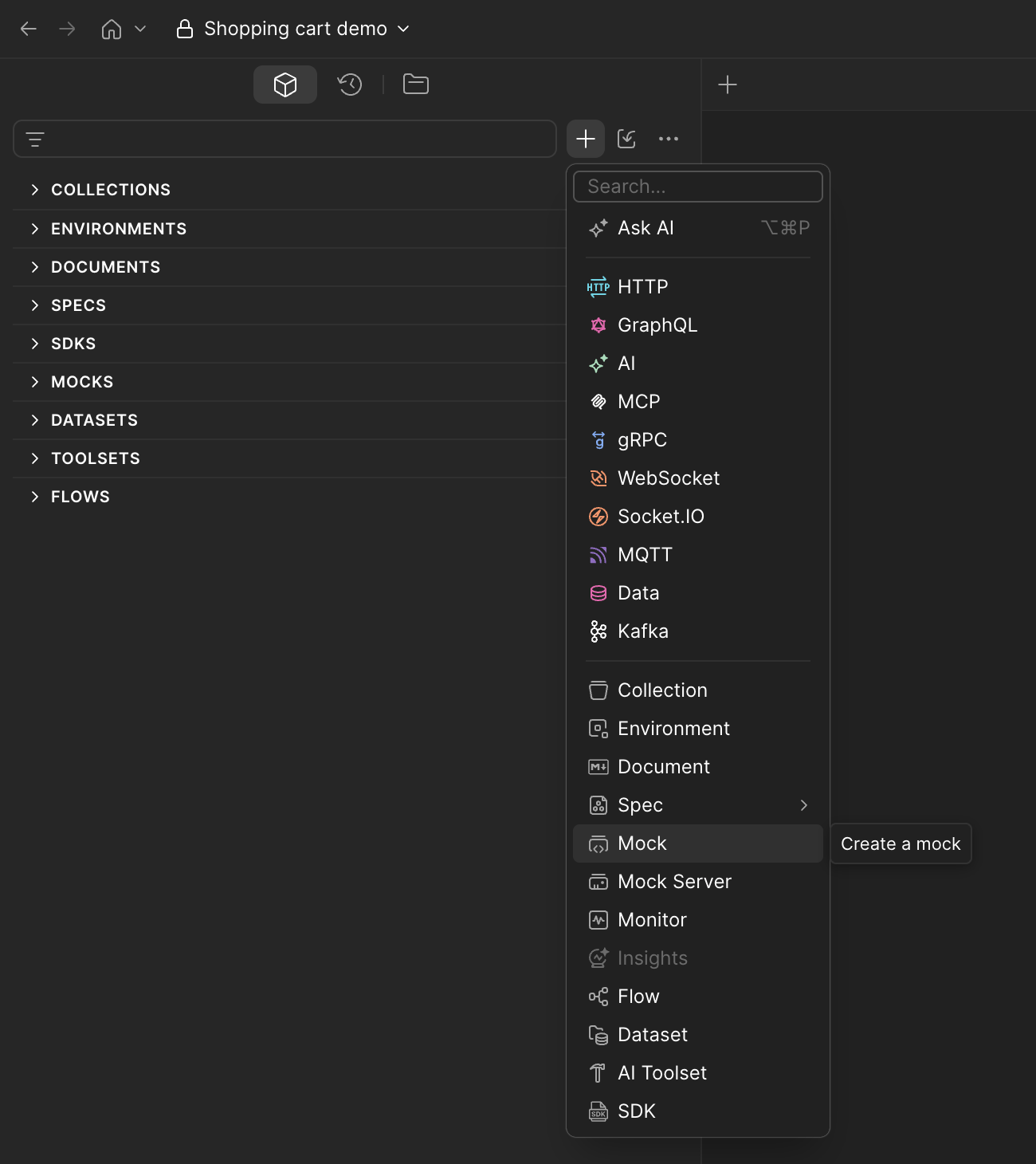
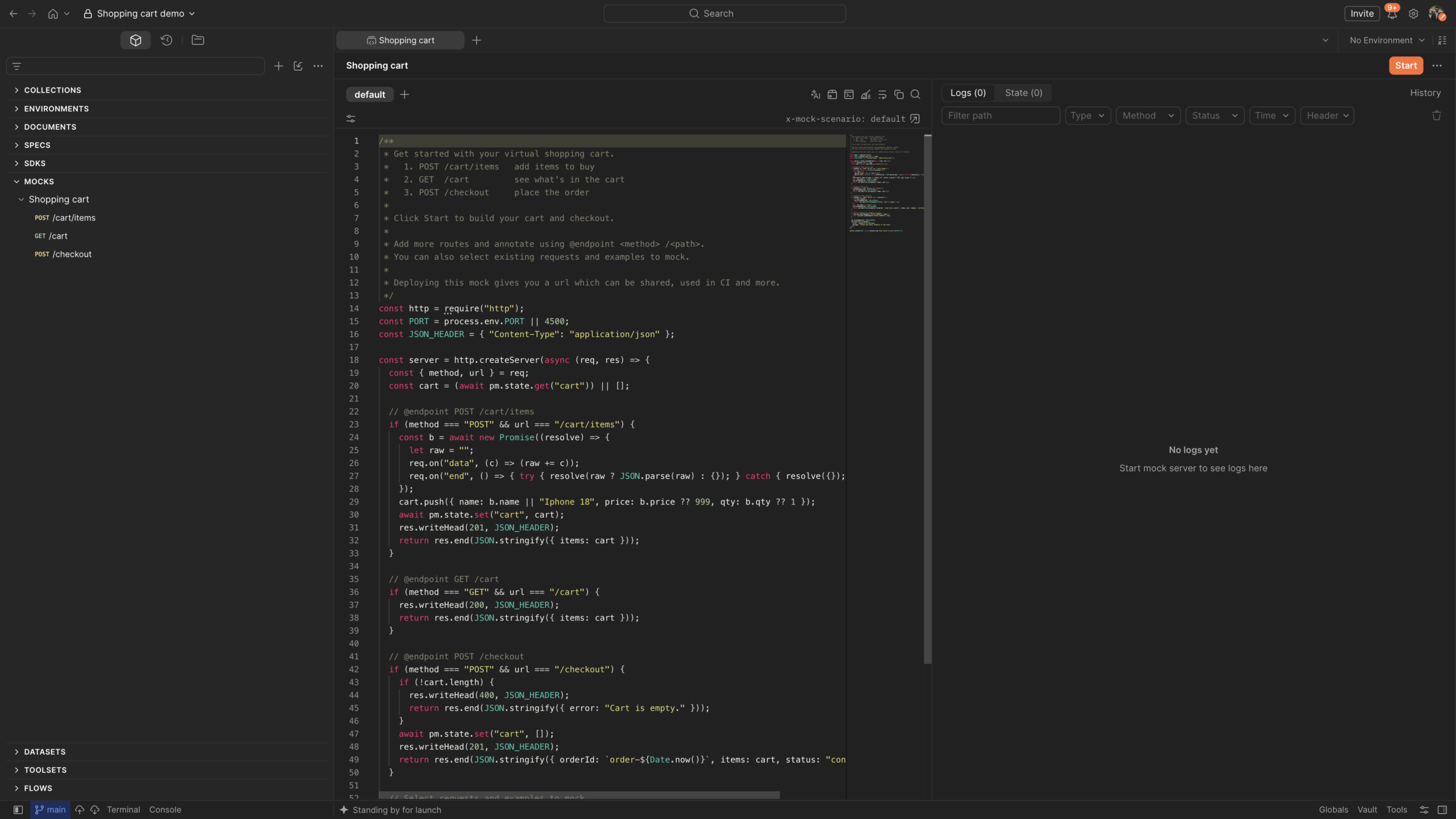
In the app. Click + → Mock. Postman creates a local server with a shopping cart example.
2. It wrote the service
The code reads the cart first:
const cart = (await pm.state.get("cart")) || [];Adding an item saves the cart back with pm.state.set, so the next GET sees it. The agent added routes to add an item, read the cart, and check out. It labeled each one:
// @endpoint DELETE /cart
if (method === "DELETE" && url === "/cart") {
  await pm.state.delete("cart");
  res.writeHead(200, JSON_HEADER);
  return res.end(JSON.stringify({ items: [] }));
}
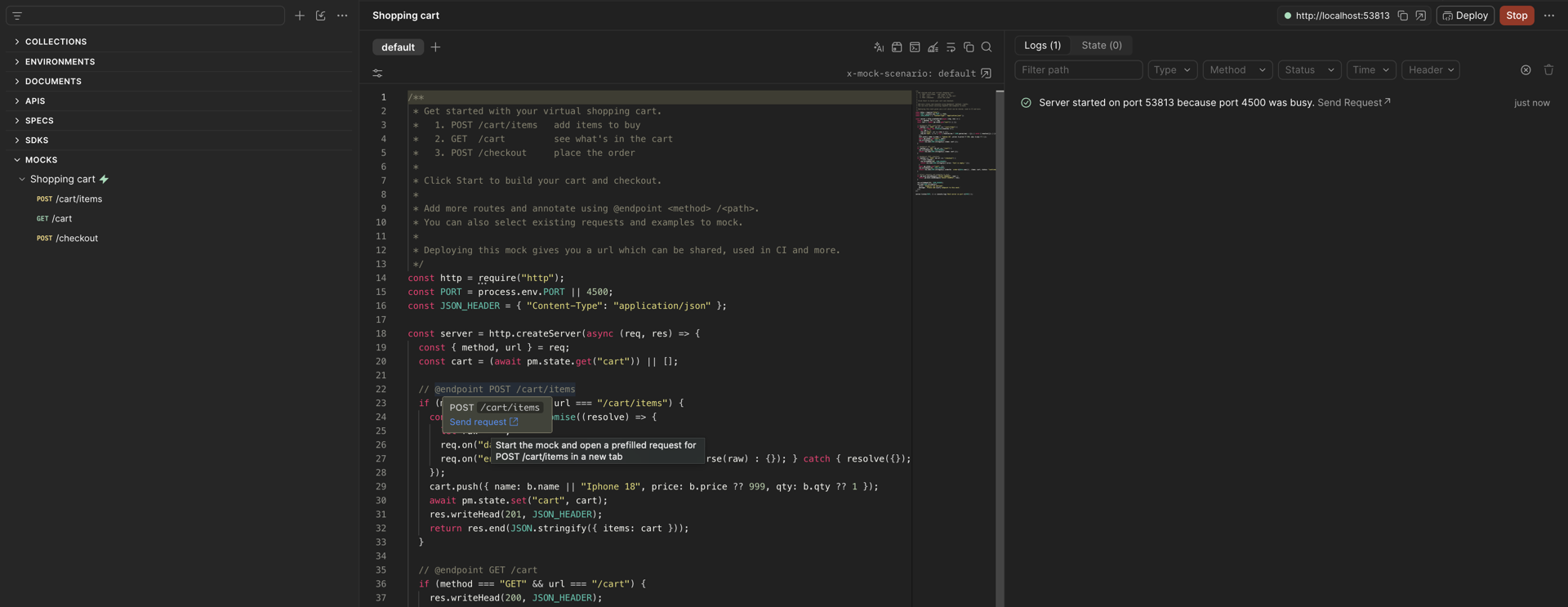
The @endpoint comment lists the route in the Postman sidebar and lets you send a request from the code on hover. When I opened the app later, the whole thing was already easy to browse.
The same trick works for a coupon, an out-of-stock item, or an expired token.
You keep what you already have, too. pm.mock.matchRequest and pm.mock.sendExample let the mock return one of your saved examples when a request matches. Examples and logic live in the same file.
3. It checked its own work
postman mock run ./postman/mocks/shopping-cart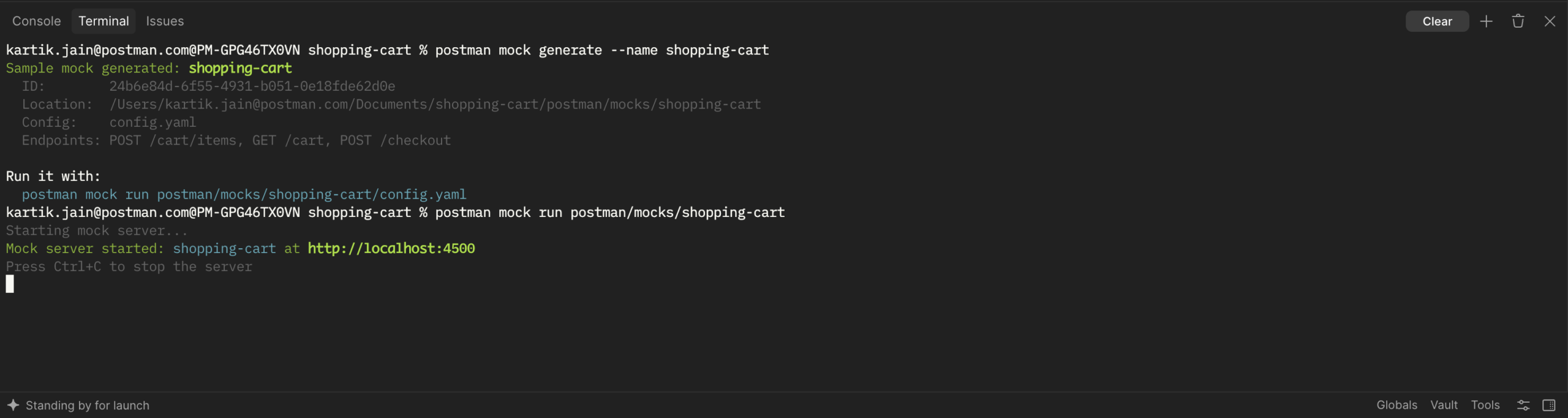
The mock runs on localhost:4500 and prints a live request log. If that port is busy, it picks another one. In a second terminal, the agent called the thing it had just written:
postman request GET http://localhost:4500/cart
postman request POST http://localhost:4500/cart/items \
  --header "Content-Type: application/json" \
  --body '{"name": "iPhone 18", "price": 999, "qty": 1}'
postman request GET http://localhost:4500/cart
{ "items": [{ "name": "iPhone 18", "price": 999, "qty": 1 }] }The second GET has the item the POST added. Then checkout:
postman request POST http://localhost:4500/checkout{
"orderId": "order-1764500000000",
"items": [{ "name": "iPhone 18", "price": 999, "qty": 1 }],
"status": "confirmed"
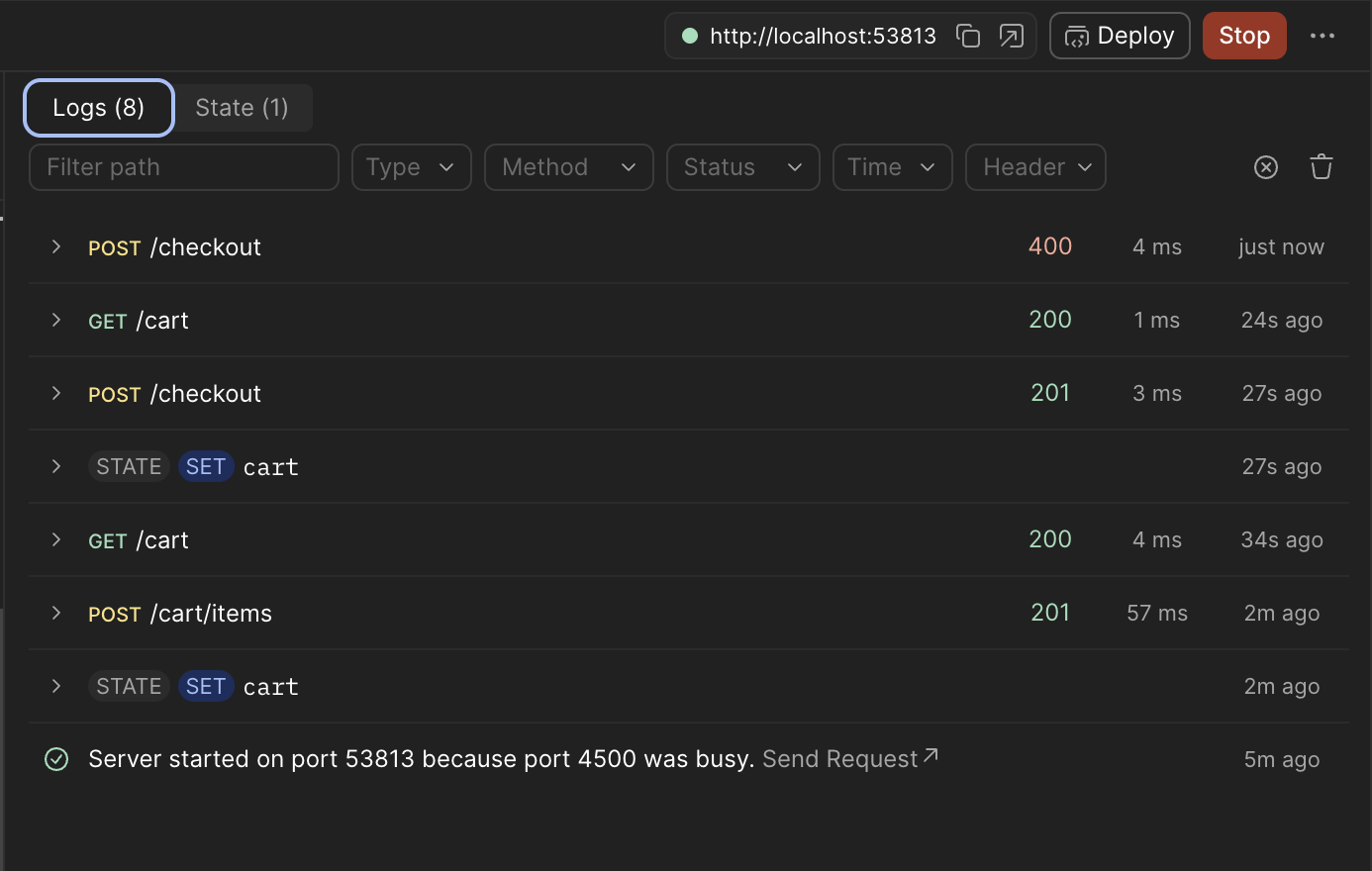
}Checkout empties the cart. A later GET /cart comes back empty, and a second checkout returns 400.
Create, read back, change state, reject. Most integrations that break, break somewhere in that sequence. Here the agent ran all four before it showed me anything, because the mock remembered and the log told it what really happened.
In the app. Click Start, then Send Request from the logs, from in-code annotations, or from the sidebar. Watch the logs and the saved state as you go.
4. It made the service misbehave
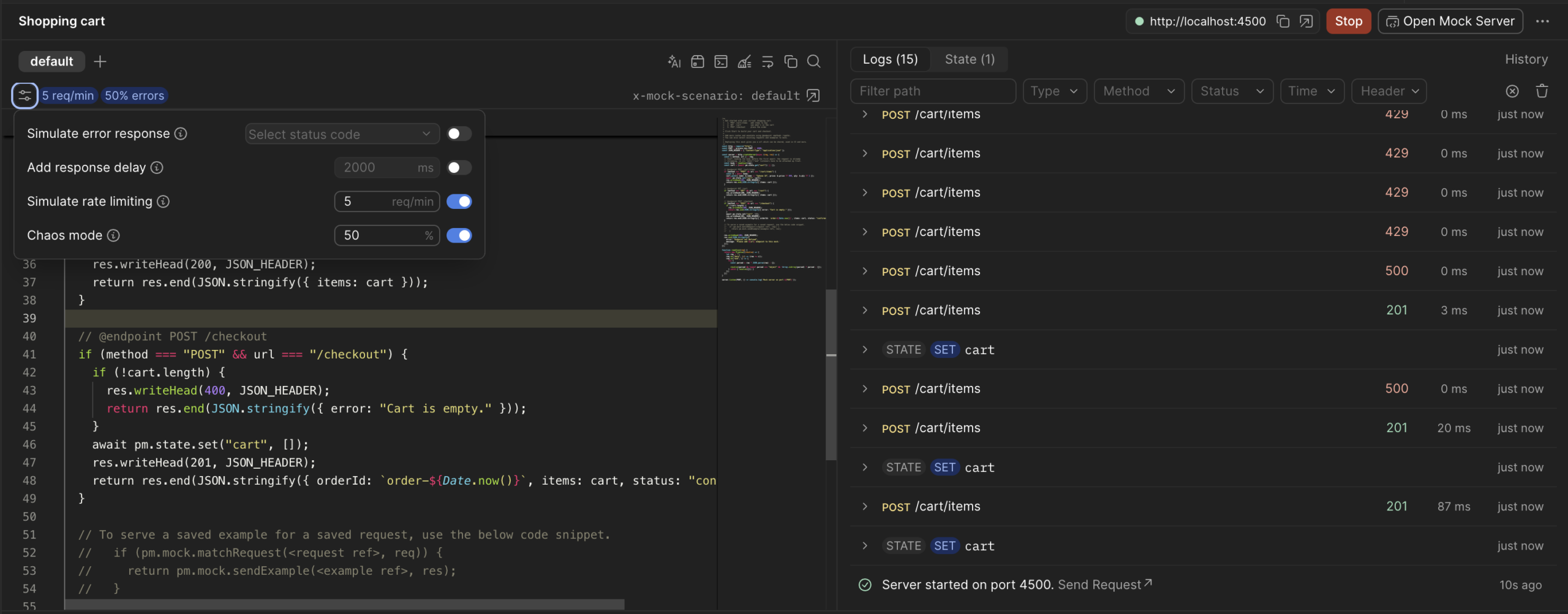
I had asked for failure, because failure is part of the contract. A cart service owes its callers a 429 when they hammer a high-demand item or face unexpected 5xx errors. The agent turned on Behaviors, the dials for rate limit and chaos mode. Then it replayed the same sequence against a cart service that was now unreliable.
The log showed what a caller would see. Intermittent 5xx from the chaos mode, then clean 429s once the rate limit kicked in.
That is the part I would not want to skip. Failure paths are the hardest part of a contract to demonstrate, because a real service will not fail on request. Behaviors make it fail on request, and you do not have to add temporary failure logic to your code and risk shipping it.
5. It gave a stable URL
postman workspace push
postman mock list   # find the mock server id
postman mock deploy <mockServerId> --slug shopping-cart --name "Shopping cart"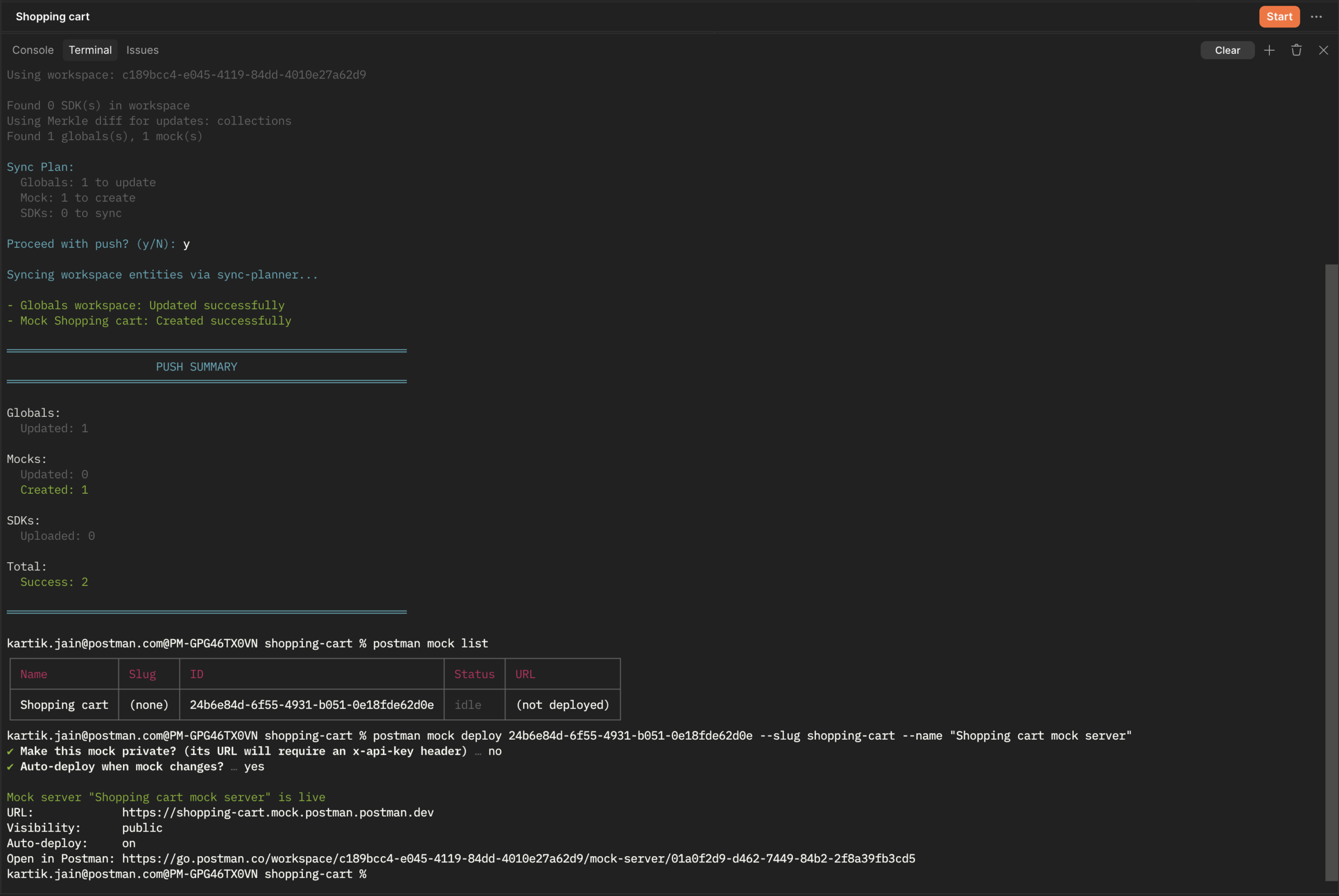
Deploy runs the mock as a live mock server in the Postman cloud and gives it a stable URL that your team, CI, and every agent on the repo can use:
postman request GET https://shopping-cart.mock.<team-domain>.postman.dev/cart \
  -H "x-api-key: $POSTMAN_API_KEY"
A mock server is private by default and needs an x-api-key header. You can add --public to make it accessible to everyone.
postman mock deploy <mockServerId> --slug shopping-cart --publicIn the app. Click Deploy.
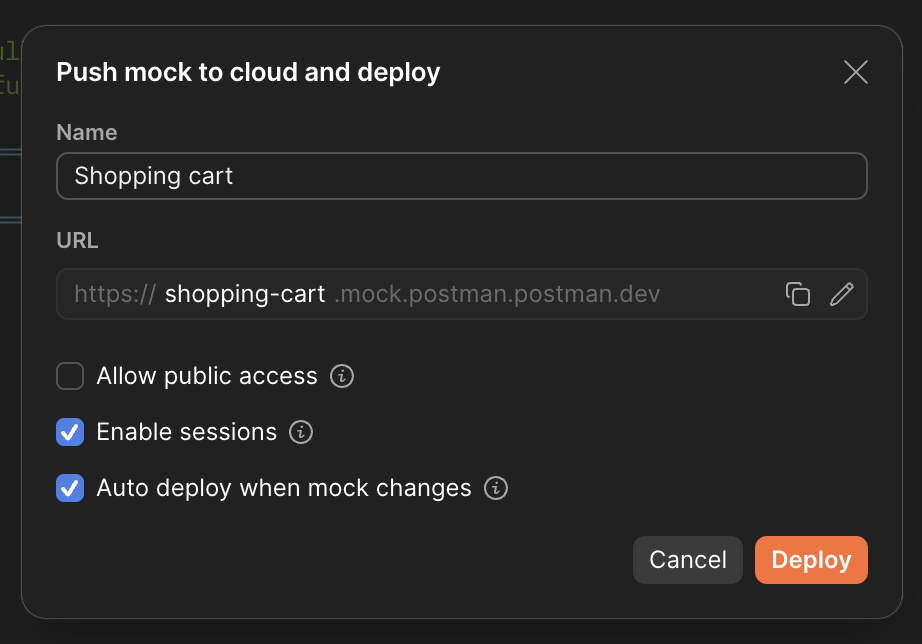
If you are signed in to the Postman App or CLI, you can reach a private mock server without an API key. Otherwise, get your Postman API key.
The agent is still the one running it, so it reads deployed traffic the same way it read the local log:
postman mock get <mockId>
postman mock log <mockServerId> --method GET --status 5xx --json
--json matters more than it looks. It is the difference between a log you squint at and a log your agent can read and act on.

6. It kept callers apart
State is shared by default, so two callers share one cart. An x-mock-session header gives each caller its own:
postman request POST https://shopping-cart.mock.<team-domain>.postman.dev/cart/items -H "x-mock-session: alice"
postman request GET https://shopping-cart.mock.<team-domain>.postman.dev/cart -H "x-mock-session: bob"
Alice’s cart has the item. Bob’s is empty. Three developers and their three agents can use one mock server without stepping on each other.
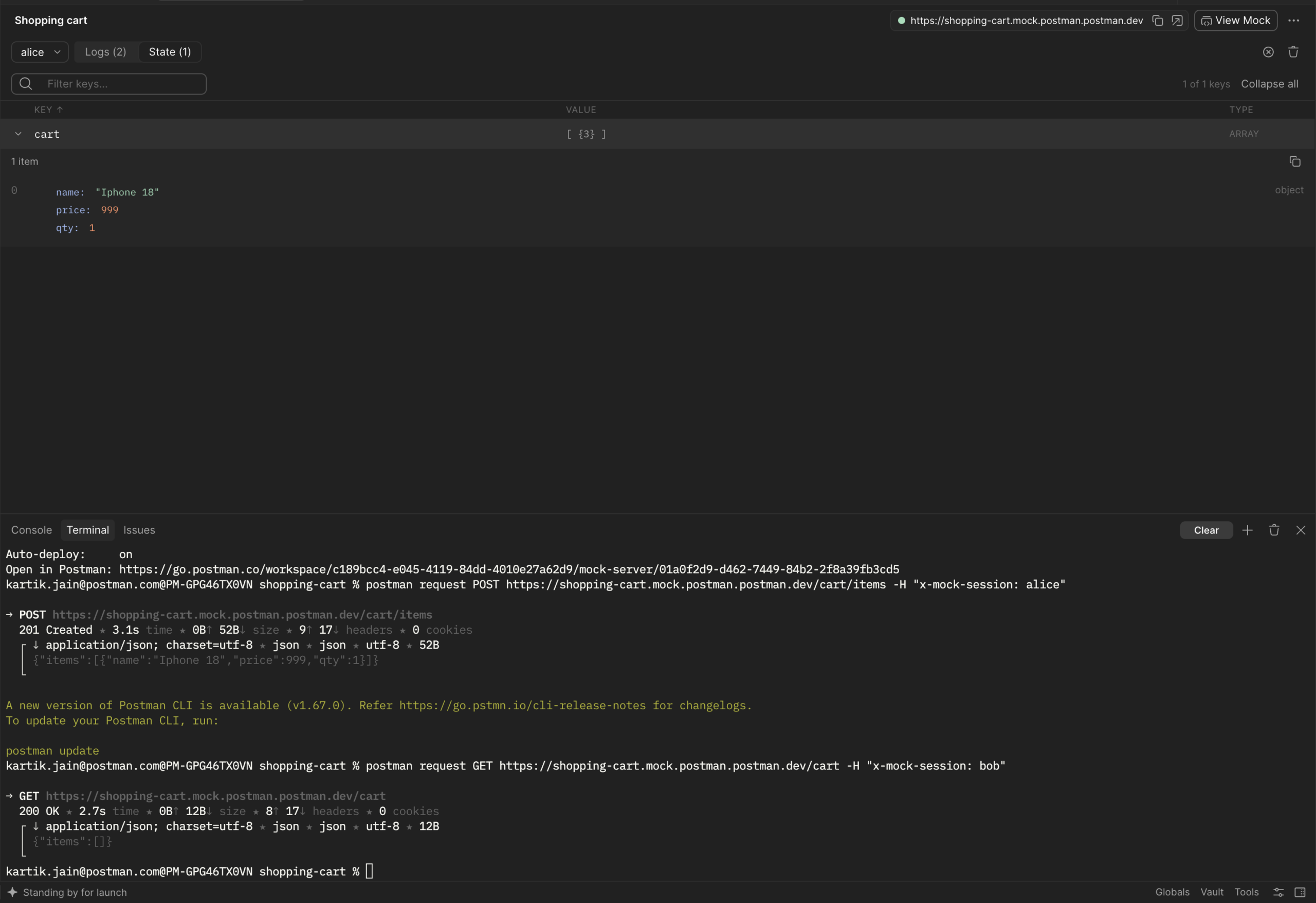
The whole run took about as long as a standup. The real cart service is still a few sprints out, but nobody is waiting on it now.
You are still the reviewer
The agent did the work. It did not get the last word.
All of it came to me as a diff: a JavaScript file I could read, modify with agents and push to git with Postman git workflows. That is the real reason a mock should be a program. A saved response is something you either trust or you don’t. A program is something you can review.
And when the real cart service shipped with a different contract, the fix was a pull request against the mock. This mock can be used to assert contracts as well. I will talk more on this soon. For now, check out the docs.
Where this is going
One mock is one dependency. Real systems have several, and the interesting failures happen between them. The payments service succeeds; inventory times out.
So the next step is a Simulation: several mocks grouped behind one address on your team domain, each with its own state and Behaviors, addressed the way your real services are. You will be able to build one from your specs, your captured traffic, or your test runs, and keep it current as those change.
After that, the feedback gets better. When a request breaks the contract, a 400 is not much help. What helps is a reply your agent can read: which field was wrong, what was expected, and what the right order of calls is. Then it fixes itself in the same turn instead of the next sprint.
Up next, we will cover scenarios: making one mock behave differently in different situations, so the same POST /cart can enforce a rate limit on a high-demand item and stay normal otherwise. If you want to go deeper now, visit the Postman Learning Center.
Try it
Creating and running code-based mocks locally is free for everyone. Cloud deployment is on paid plans. Download Postman or install the Postman CLI:
curl -o- "https://dl-cli.pstmn.io/install/unix.sh" | shThen point your agent at it and describe the dependency you do not have yet.
Resources
- Set up and use mock servers in Postman
- Install the Postman CLI
- Develop locally with native git in Postman
- Authenticate with the Postman API
- Download Postman




What do you think about this topic? Tell us in a comment below.