
API vs Web Service: Understanding the Differences

Quick answer: API vs Web Service
| Question | Answer |
|---|---|
| What’s the main difference? | Web services use HTTP/HTTPS; APIs can use any protocol. |
| Are all web services APIs? | Yes, web services are a subset of APIs. |
| Are all APIs web services? | No, many APIs don’t use web protocols. |
| When to use SOAP? | Enterprise systems, financial transactions, high security. |
| When to use REST? | Modern web apps, public APIs, microservices. |
| Can APIs be local? | Yes, APIs can work without a network. |
| Must web services use HTTP? | Yes. By definition, web services use HTTP/HTTPS. |
| Which is more flexible? | APIs. Web services have specific constraints. |
Table of Contents
- Quick answer
- Understanding APIs vs. web services
- What is an API?
- What is a web service?
- Key differences
- Types of web services
- How APIs and web services work
- APIs beyond web services
- Real-world use cases
- Testing APIs and web services in Postman
- Choosing the right approach
- Best practices
- Common mistakes to avoid
- Final thoughts
Understanding APIs vs. web services
Here’s what catches developers off guard: all web services are APIs, but not all APIs are web services. These terms are sometimes used interchangeably, but the distinction is important.
APIs and web services represent different approaches to software communication:
-
Use APIs when you need flexible communication across various protocols and formats.
-
Use web services when you need a consistent, standardized way to communicate over HTTP/HTTPS.
In this guide, we’ll cover the practical differences between APIs and web services, and we’ll also include real-world examples of each one as well as testing strategies in Postman.
What is an API?
An application programming interface (API) defines how different software components interact. APIs can use various protocols, data formats, and architectures.
They can connect:
-
Locally (same machine)
-
Across networks
-
In cloud environments
APIs can be built on REST, GraphQL, gRPC, WebSockets, or even custom RPC systems.
Example: Local API (no network)
import os
current_dir = os.getcwd()
files = os.listdir('/path/to/directory')
Example: REST API over HTTP
GET https://api.example.com/users/12345
Authorization: Bearer token123
Accept: application/json
Response:
{
  "id": "12345",
  "name": "Priya Postmanaut",
  "email": "[email protected]",
  "role": "Developer"
}
What is a web service?
A web service is an API designed to communicate over the web using HTTP or HTTPS. It adheres to established standards for interoperability across systems and platforms.
A web service API:
-
Always uses HTTP/HTTPS
-
Typically exchanges XML (SOAP) or JSON (REST)
-
Requires network communication
-
Provides machine-readable service descriptions (WSDL, OpenAPI)
-
Enables platform-independent interoperability
Example: SOAP web service
POST /WebService.asmx HTTP/1.1
Content-Type: text/xml

<?xml version="1.0"?>
<soap:Envelope xmlns:soap="http://schemas.xmlsoap.org/soap/envelope/">
  <soap:Body>
    <GetUserDetails xmlns="http://example.com/">
      <UserId>12345</UserId>
    </GetUserDetails>
  </soap:Body>
</soap:Envelope>
Example: RESTful web service
POST https://api.example.com/orders
Content-Type: application/json
Authorization: Bearer token123

{
  "product_id": "789",
  "quantity": 2
}
Key differences
| Aspect | API | Web service |
|---|---|---|
| Scope | Broad (any software interface) | Subset of APIs that use web standards |
| Protocol | Any (HTTP, TCP/IP, local, custom) | Strictly HTTP/HTTPS |
| Data format | Any (JSON, XML, binary, proprietary) | XML (SOAP) or JSON/XML (REST) |
| Network | Optional | Required |
| Standards | Optional | Follows W3C standards |
| Architecture | REST, GraphQL, gRPC, WebSockets, RPC | Primarily SOAP or REST |
APIs can use any communication method, including HTTP for web, TCP/IP for networking, or local function calls within the same process. Web services are tied to the web layer (HTTP/HTTPS), providing standardization and wide compatibility but offering less flexibility for non-web use cases.
Types of web services
SOAP (Simple Object Access Protocol)
SOAP uses XML messaging and formal contracts (WSDL) to ensure reliability, strict validation, and security, making it ideal for regulated systems.
Use SOAP when you need:
-
Message-level security (WS-Security)
-
Transaction guarantees (ACID)
-
Reliable messaging
-
Integration with legacy enterprise systems
REST (Representational State Transfer)
REST uses standard HTTP methods (GET, POST, PUT, DELETE) and lightweight JSON or XML payloads.
Use REST when you need:
-
Scalability across microservices
-
Easy web and mobile integration
-
Rapid development and testing
-
Compatibility with public APIs
How APIs and web services work
Every API or web service call follows the same basic pattern:
-
A client (like a browser, app, or another service) sends a request.
-
The server processes the request, accessing databases or logic.
-
The server sends back a response, often formatted as JSON or XML.
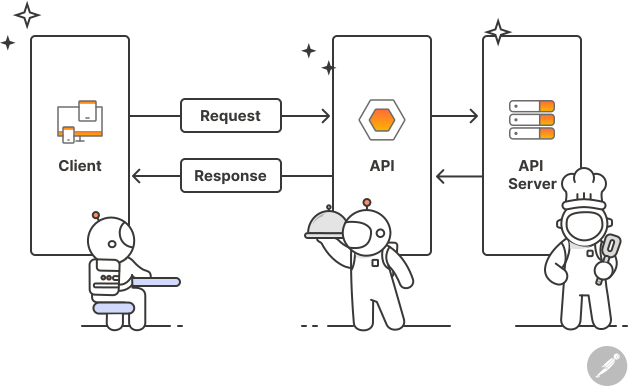
APIs can utilize various types of connections for this exchange. REST uses HTTP verbs, gRPC uses binary streams, and WebSockets maintain open connections for real-time communication.
Web services follow the same model, but always through web protocols. A SOAP service, for instance, wraps requests and responses inside XML envelopes that include security tokens and routing metadata.
APIs beyond web services
APIs have many uses that go beyond communication via web.
Library APIs
from datetime import datetime, timedelta
tomorrow = datetime.now() + timedelta(days=1)
Operating system APIs
import os
os.mkdir('/tmp/mydir')
Hardware APIs
navigator.mediaDevices.getUserMedia({ video: true })
  .then(stream => video.srcObject = stream)
Remote procedure call APIs
service UserService {
  rpc GetUser(UserRequest) returns (UserResponse);
}
Real-world use cases
Web services
-
Banking: Secure SOAP transactions with WS-Security
-
Government: Regulated citizen data exchange
-
Healthcare: FHIR APIs with HIPAA compliance
APIs beyond web services
-
Mobile apps: Device APIs for sensors, camera, and GPS
-
Real-time apps: WebSocket APIs for chat or collaboration
-
Microservices: REST for external, gRPC for internal traffic
Testing APIs and web services in Postman
In Postman, you can test both SOAP and REST services from the same workspace with no additional setup. Teams often prototype RESTful APIs first, then expand to SOAP-based web services for enterprise integrations.
To validate an API or web service:
-
Create a request and set your endpoint (SOAP or REST).
-
Add headers such as
Content-Typeor authentication tokens. -
Add your request body or SOAP envelope.
-
Click Send, then view the live response.
-
Add lightweight test scripts to validate behavior:
pm.test("Response status is 200", function () {
  pm.response.to.have.status(200);
});
You can also:
-
Use environments to store endpoints and API keys.
-
Automate runs with the Collection Runner or CLI for CI/CD integration.
-
Share test collections with your team or partners for consistent validation.
Choosing the right approach
The right choice depends on your system’s goals and constraints.
Choose web services when you need:
-
Standardization
-
Enterprise security
-
Transactions
-
Formal contracts
-
Legacy integration
Choose general APIs when you need:
-
Protocol flexibility
-
Local integration
-
Modern patterns
-
Performance
-
Rapid development
Best practices
For web services
-
Provide WSDL for SOAP services to enable automatic client generation.
-
Handle errors with SOAP Faults for clear debugging.
-
Version your services (
/v1,/v2) to avoid breaking existing clients.
For REST APIs
-
Keep endpoints simple and resource-based:
✅ GET /users/12345/orders ❌ GET /getUserOrders?userId=12345 -
Return meaningful HTTP status codes (
200,201,404,500). -
Implement pagination for large data sets.
-
Use rate limits to prevent abuse.
For all APIs
-
Design for consumers. Consistency builds trust.
-
Use Postman monitoring and logging to track usage and performance.
-
Return clear, structured error messages for developers.
Example: Clear error response
{
  "error": {
    "code": "INVALID_PARAMETER",
    "message": "Email must be valid",
    "parameter": "email"
  }
}
Common mistakes to avoid
Using SOAP when REST would suffice
SOAP’s complexity adds overhead. If you don’t need message-level security or ACID transactions, REST’s simplicity and speed make it a better choice for most modern applications.
Confusing web APIs with all APIs
Not all APIs require HTTP. When building embedded systems, IoT devices, or local libraries, don’t default to web protocols—consider what communication method best fits your architecture.
Ignoring rate limits
Whether using SOAP or REST, implement rate limiting to protect your services:
X-RateLimit-Limit: 1000
X-RateLimit-Remaining: 847
Exposing sensitive data in URLs
Never include passwords, tokens, or personal data in GET request URLs. Use POST with request bodies and always encrypt with HTTPS.
Final thoughts
APIs and web services are both essential for modern software communication. APIs offer flexibility across various protocols and environments, while web services ensure interoperability through standard web protocols.
Whichever you use, Postman helps teams design, test, and monitor both within the same platform, bringing consistency, visibility, and speed to every stage of your API lifecycle.







What do you think about this topic? Tell us in a comment below.