
From Git Push to API Compliance: CI Spec Linting with Postman API Catalog

We’ve all been there: you’re tasked with integrating a service owned by another team, but the documentation is a year old, the Swagger UI is 404ing, and the “source of truth” is buried in a Slack thread from 2022.
In large organizations, this isn’t just an inconvenience — it’s a systemic problem. API specs live scattered across Git repos, CI dashboards, and individual team wikis. Platform engineers spend significant time assembling an accurate picture of the API landscape, and by the time they do, something has already changed.
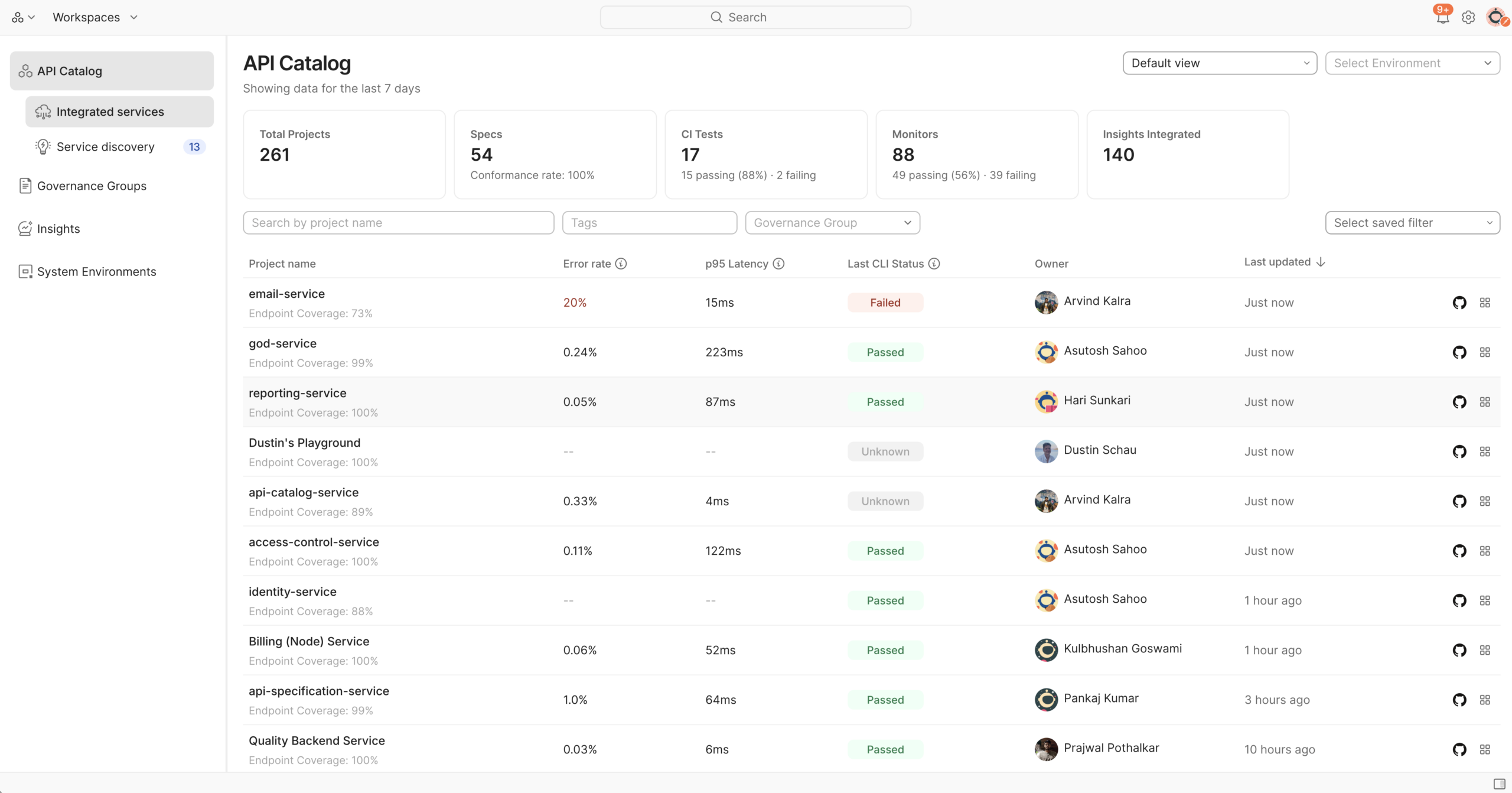
Postman’s API Catalog gives you a centralized, always-current view of your APIs: what exists, where each API is defined, what governance rules apply to it, and what its current health looks like across environments. In this guide, we’ll see how to use Agent Mode and API Catalog to set up spec linting, enforce governance rules in CI, and maintain a current view of your APIs.
Step 1: Connect Your Repository to API Catalog
Rather than manually registering every API, API Catalog integrates directly with your source repositories. When you connect a GitHub repository to your Postman workspace, Postman scans it and adds the APIs it finds to the Catalog automatically.
What it picks up: API definitions (OpenAPI, AsyncAPI), collections, and — if you’re running the service endpoints running in your Kubernetes cluster. For a service that exists in your cluster but has no Postman-managed spec yet, the Catalog can automatically open a Pull Request to your repository with a generated OpenAPI spec. This brings the service under management without requiring a developer to stop what they’re doing and write documentation from scratch.
To connect your repository:
- Open your workspace in Postman and navigate to API Catalog.
- Select Connect Repository and authenticate with GitHub.
- Choose the repository to link. Postman will scan it and surface any API definitions it finds.
Step 2: Generate a Spec, Add Linting, and See Results in API Catalog
Generate an OpenAPI spec from your collection
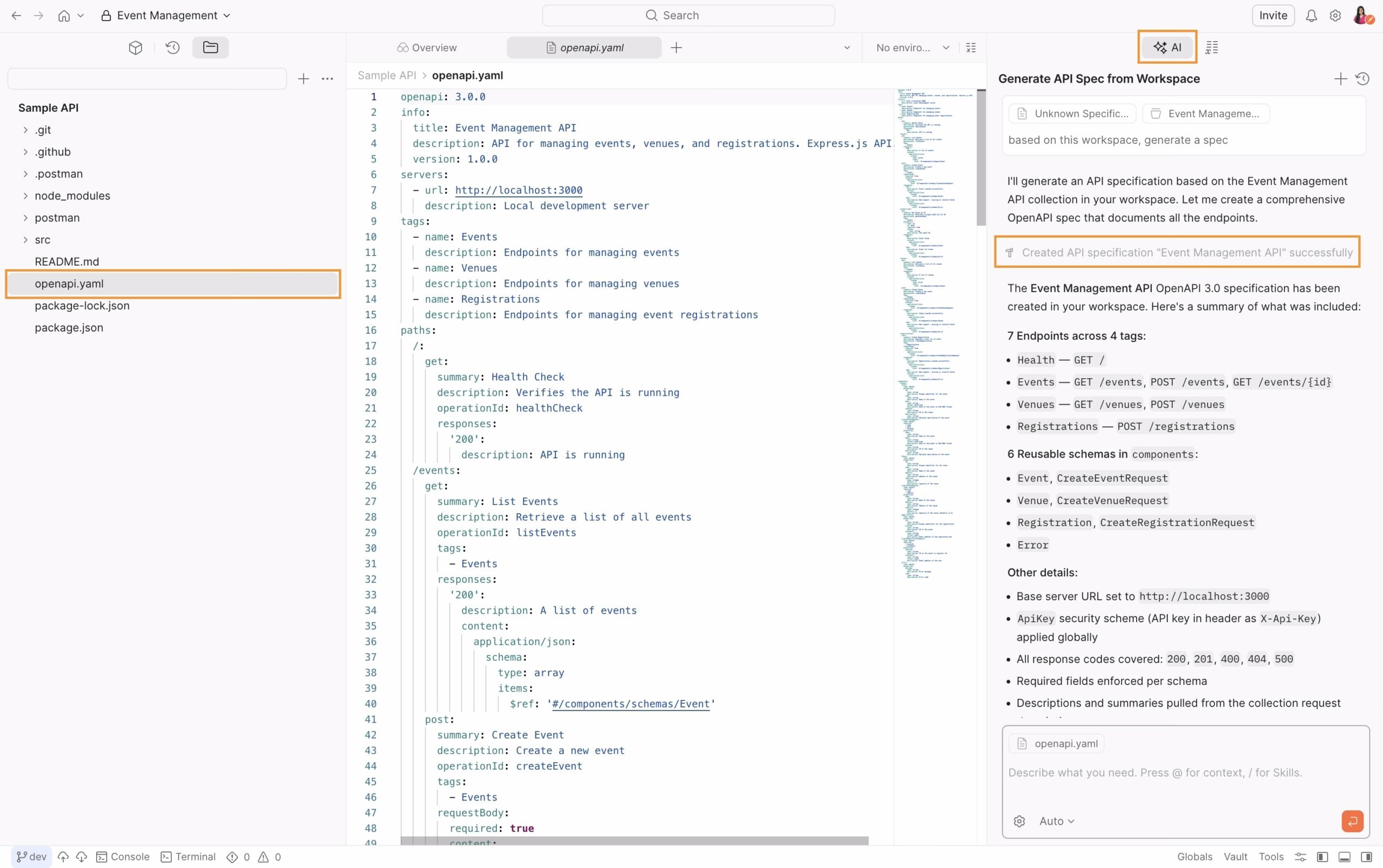
If your API has been built and tested in Postman but doesn’t have a formal OpenAPI spec yet, Agent Mode can generate one from your existing collection. To open Agent Mode, click the Ask AI button in the Postman app. Once it’s open, ask:
“Generate an OpenAPI spec from my collection.”
Agent Mode produces a complete spec — all endpoints, with request and response schemas derived from the examples in your collection. In the example below, this produces an openapi.yaml file covering all endpoints, with full request/response schemas, ready to use.
Add the spec to your codebase and merge it
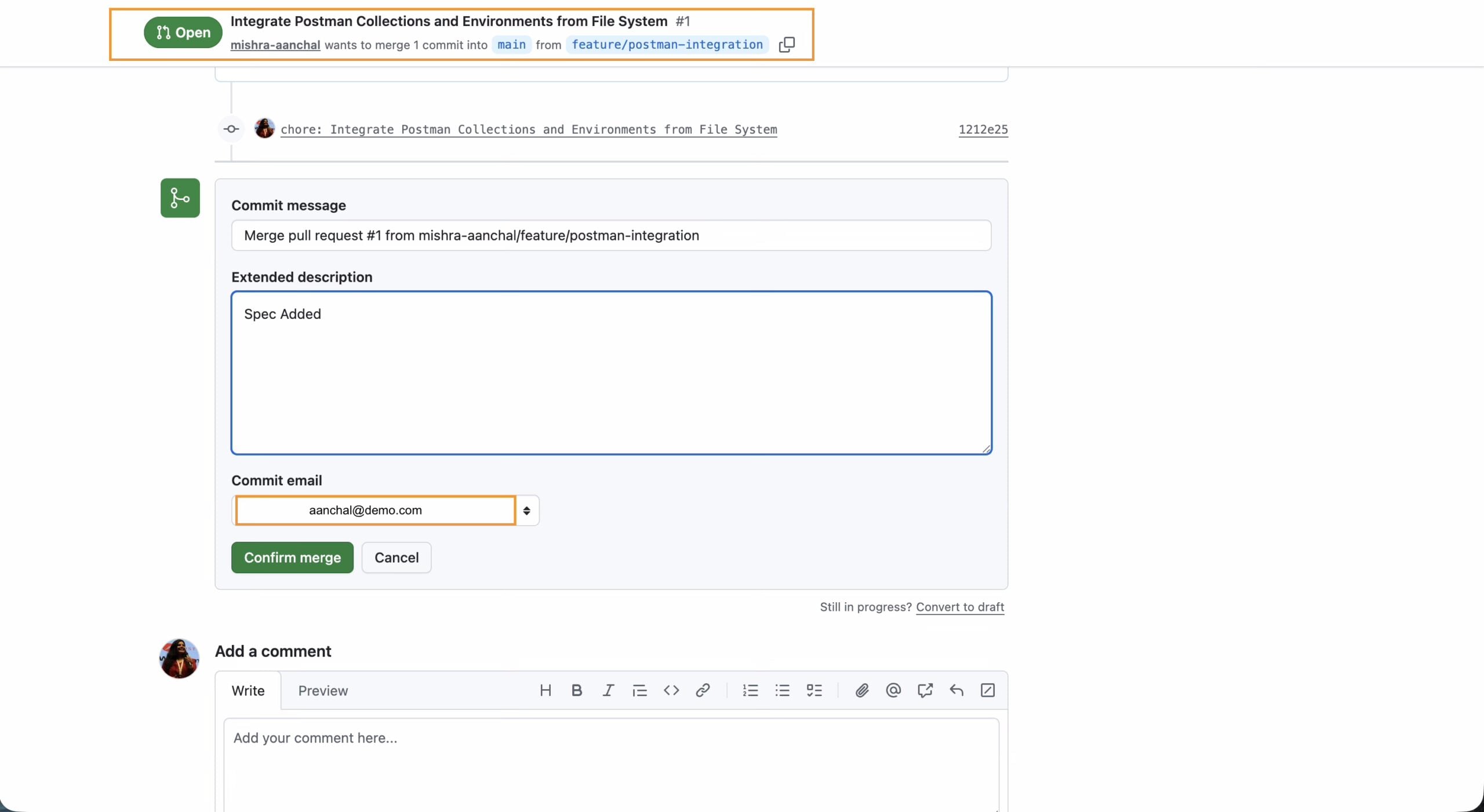
Once you’re happy with the generated spec, add it to your repository and open a pull request. After merging, API Catalog will detect it automatically because your repository is already connected. No manual registration needed.
Ask Agent Mode to add a spec linting step to your CI config
Rather than writing the CI step yourself, ask Agent Mode to do it:
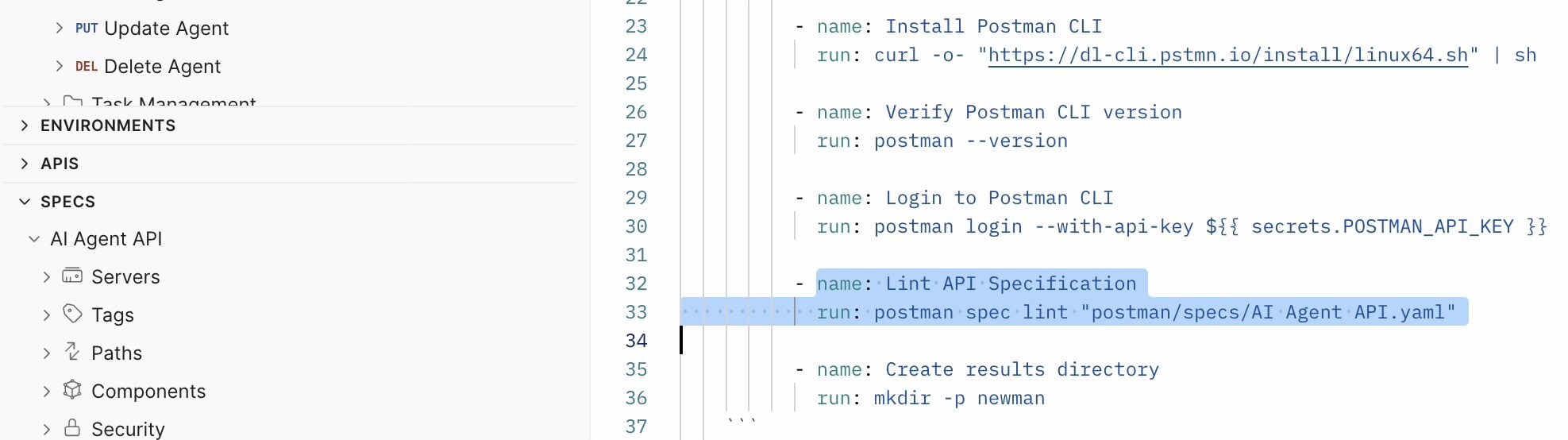
“Add a spec linting step to my file using the postman spec lint command.”
Agent Mode will add a new job step to your existing workflow file. The resulting step looks like this:
View violations in API Catalog
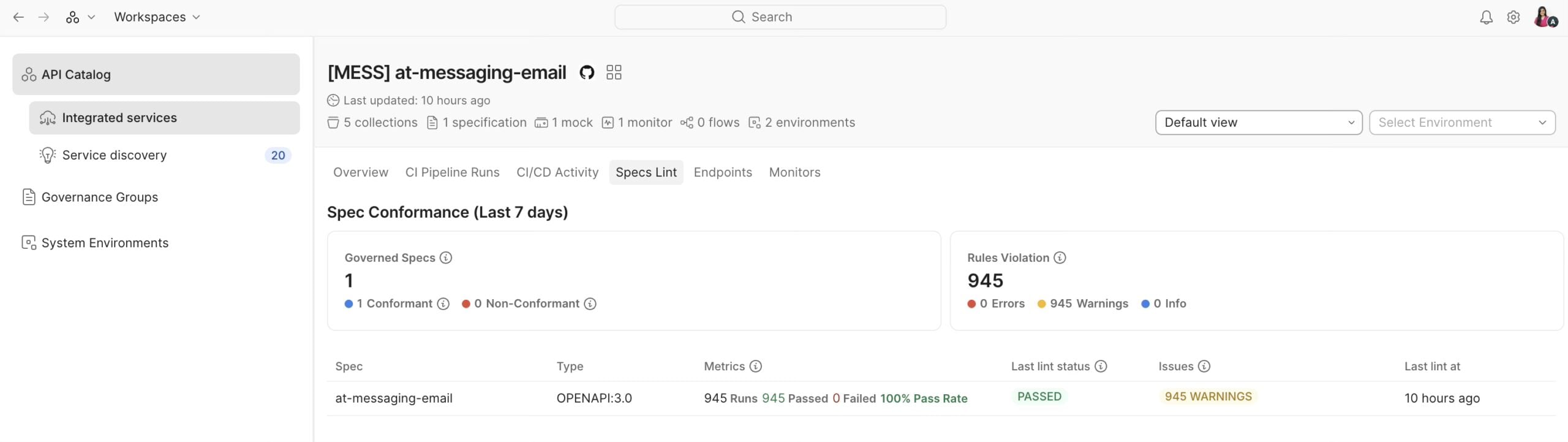
Once the CI step runs, navigate to your service in API Catalog. You’ll see the spec Agent Mode generated listed under the service, and next to it, the spec linting results are displayed, including how many rule violations were found and which ones. Surfacing insights via the API Catalog eliminate the need to dig through CI logs.
From there you can click into each violation, see exactly which endpoint and field is affected, fix it in your spec, and push again. Each push re-runs the lint step and updates the Catalog.
Step 3: Tracking Your API Across Environments
In practice, “does this API work?” is a question that has a different answer in staging vs. production. API Catalog’s System Environments lets you map the same API to its different deployment contexts and see health data from each in one place.
For a typical service, you might configure:
- Staging: Connected to your CI/CD pipeline, showing latest test pass rates and any new spec violations introduced in the current branch.
- Production: Connected to your observability stack via the cluster watcher, showing live p95 latency, error rates, and uptime for each endpoint.
This means when a developer is reviewing the Catalog entry for an API before integration work, they’re not looking at a static spec — they’re looking at the spec alongside current runtime behavior.
To set this up:
- Open the API in the Catalog and navigate to Service Environments.
- Add an environment record for each deployment (Staging, Production).
- Connect each environment to its data source: a CI/CD pipeline for test results, and the for runtime metrics
Step 4: Access Control in API Catalog
API Catalog visibility follows your Postman workspace and team permissions. You don’t need to configure a separate access layer.
In practice this means:
- Platform/principal engineers with access to all workspaces see the full Catalog — every API, every environment, the global compliance posture across all teams.
- Feature developers see their own workspaces, the APIs they depend on, and the governance rules that apply to them. They don’t see APIs from workspaces they’re not a member of.
This is worth calling out because a common concern with centralized catalogs is that they become either fully open (creating noise) or locked down (becoming useless). API Catalog threads this by inheriting the permission model you’ve already set up in Postman rather than adding a second one to maintain.
Putting It Together
The best place to start is connecting your GitHub repository to Postman. You don’t need to be thinking about API Catalog yet — connecting your repo has immediate benefits for your day-to-day development: your collections, specs, and code stay in sync, and your team has a single place to find what’s current.
But it also means that when you’re ready to use API Catalog, you’re already set up. Your APIs will appear in the Catalog from day one, with no backfill work needed.
From there, the workflow is straightforward:
- Connect your GitHub repo to your Postman workspace — your API definitions appear in the Catalog automatically.
- Use Agent Mode to generate a spec from your collection, merge it into your repo, then ask Agent Mode to add a postman spec lint step to your CI config.
- View violations in API Catalog — the linting results appear alongside the spec, showing exactly which endpoints and rules are affected.
The result: the Catalog is an accurate, current view of your APIs — not because someone maintains it, but because it’s wired directly into the places where your APIs change.The goal is to produce unbreakable APIs.







What do you think about this topic? Tell us in a comment below.