
API Diagram Guide: Types, Use Cases, and Examples

Quick answer: Which API diagram should you use?
Choose the API diagram based on what you’re trying to communicate. The chart below shows what each diagram type is best for and provides an example use case.
| Diagram type | Best for | Example use case |
|---|---|---|
| Sequence diagram | Step-by-step API flows | Visualizing OAuth login or checkout process |
| Architecture diagram | System overview | Microservices ecosystem |
| Data flow diagram | Tracking data movement | GDPR compliance mapping |
| Component diagram | API module structure | Planning API refactoring |
| State diagram | Resource lifecycle | Order status transitions |
| Integration diagram | External service connections | Third-party API setup |
| Error flow diagram | Exception handling | Retry logic and fallback mechanisms |
| API gateway diagram | Traffic management | Rate limiting and routing |
Table of Contents
What is an API diagram?
An API diagram is a visual representation of an API. You can think of it like a map. It shows how data moves, who’s talking to whom, and what happens along the way, and a good one helps every team across the organization see the same picture.
API diagrams typically include some combination of these elements:
-
Endpoints and resources: URLs like
/api/usersor/api/orders/123. -
Request and response flows: The direction data travels between clients, servers, and other services, including what data is sent and what comes back.
-
Authentication mechanisms: How the API verifies identity, whether through API keys, OAuth tokens, or other methods.
-
Data structures: The format and shape of data being exchanged, often represented as JSON objects or database schemas.
-
System dependencies: Other services, databases, or external APIs that your API relies on.
-
Status codes and errors: What happens when things go wrong, including error responses and retry logic.
API diagrams are valuable throughout the entire API lifecycle. During design, you can sketch out how your API will work before writing code, helping you spot potential issues early and make better architectural decisions. In your API documentation, give developers a visual reference that complements your written API docs, making complex interactions immediately clear. When you need to debug your API, trace the path of requests through your system to identify where things are breaking or slowing down.
API diagrams help create a shared understanding across frontend developers, backend engineers, DevOps teams, and stakeholders who all interact with your API differently.
Why API diagrams are essential
API diagrams solve real problems faced by every development team.
Faster developer onboarding
When a new developer joins your team or needs to work with an unfamiliar API, diagrams dramatically cut down onboarding time. Instead of reading through pages of text or tracing through code, they can see the entire flow at a glance. A sequence diagram showing a payment process, for example, instantly reveals the order of operations, the services involved, and the data exchanged at each step.
Smarter design decisions
Architecture diagrams help you see the big picture before committing to implementation details. They allow you to evaluate different approaches, identify potential bottlenecks, and spot security concerns while changes are still easy and inexpensive. When planning a microservices migration, diagrams show which services need to communicate, helping you design clean boundaries.
Shared understanding across roles
Product managers and stakeholders need to understand API capabilities without diving into technical specs. Well-designed diagrams bridge this gap, showing how different parts connect without requiring technical expertise.
Improved documentation
Even the best-written documentation benefits from visual aids. Diagrams reduce ambiguity. There’s no confusion about the order of operations when a sequence diagram shows exactly which call happens first. They also make your documentation more scannable, letting readers quickly find the information they need.
Reduced integration errors
Clear diagrams prevent misunderstandings about request formats, required fields, and expected responses. Teams report fewer bugs and faster debugging when everyone references the same visual source of truth.
Types of API diagrams
Different types of API diagrams serve different purposes. Here are the most valuable types you’ll use throughout your API’s lifecycle.
Sequence diagrams
Sequence diagrams show the chronological order of interactions between components during an API workflow, using vertical lifelines for participants and horizontal arrows for requests and responses.
When to use: Multi-step authentication flows, complex transactions, asynchronous operations, or documenting webhook interactions.
Example: An OAuth flow where a user logs in → API validates credentials → API generates token → User accesses protected resource. Each step is shown in order with clear timing.
Architecture diagrams
Architecture diagrams provide a high-level view of your entire API ecosystem, showing how services, databases, external APIs, and clients connect.

When to use: Onboarding new team members, presenting to stakeholders, planning infrastructure changes, or creating governance documentation.
Example: An e-commerce platform showing frontend → API gateway → microservices (products, orders, payments, users) → individual databases.
Data flow diagrams
Data flow diagrams focus on how data moves through your API—from entry through processing, transformation, storage, and output.

Example: A data flow diagram showing how API metrics, events, and logs connect to monitoring dashboards.
When to use: Security audits, GDPR/HIPAA compliance, optimizing data pipelines, or identifying validation points.
Example: A healthcare API showing patient data flow: mobile app → encryption → validation → sanitization → secure database → audit logs at each stage.
Component diagrams
Component diagrams break down your API into modular pieces, showing how components or layers depend on each other and revealing internal structure.

When to use: Designing or refactoring architecture, planning code organization, identifying reusable components, or understanding legacy systems.
Example: A REST API showing HTTP controllers → business logic services → data access objects → external integrations, with clear interfaces between layers.
State diagrams
State diagrams illustrate different states a resource can be in and transitions between those states triggered by API calls—essential for workflow management.
When to use: APIs managing workflows (orders, tickets, approvals), resources with complex lifecycles, or preventing invalid state transitions.
Example: Order states: created → payment pending → payment confirmed → shipped → delivered, with specific API calls triggering each transition.
Integration diagrams
Integration diagrams show how your API connects with external services and third-party APIs, revealing dependencies and data exchange points.
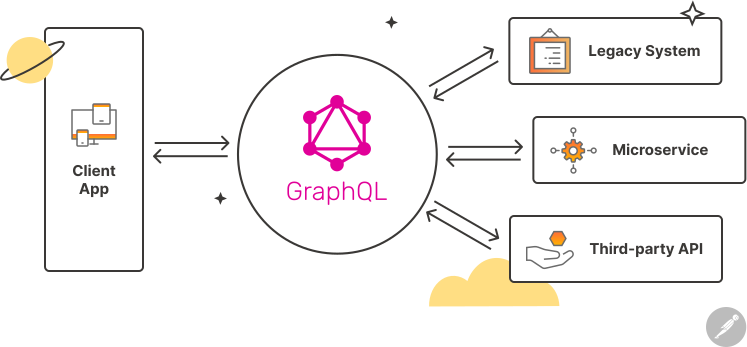
When to use: Planning new integrations, documenting dependencies for incident response, assessing external service outage impact, or evaluating vendor lock-in.
Example: A CRM API showing connections to Stripe (payments), SendGrid (emails), Twilio (SMS), and Slack (notifications).
Error flow diagrams
Error flow diagrams map what happens when things go wrong, showing failure points, error responses, and retry or recovery logic.
When to use: Designing comprehensive error handling, documenting error responses for clients, planning circuit breaker logic, or improving API resilience.
Example: A payment API showing responses for provider downtime, insufficient funds, network timeouts, and exponential backoff retry logic.
How to create API diagrams
Follow these best practices to create diagrams that effectively help your team.
Start with the user journey
Begin with what users or client applications are trying to accomplish, not your internal architecture. This keeps diagrams focused on real use cases rather than abstract technical details.
Use consistent notation
Pick a standard (like UML) and stick with it. If rectangles represent services in one diagram, use rectangles for services everywhere. Consistency reduces the learning curve.
Keep diagrams focused
Each diagram should illustrate one concept or workflow. If your diagram doesn’t fit on a single screen, it’s probably trying to show too much. Split it into multiple focused diagrams.
Show both success and failure
Many diagrams only show the “happy path,” but real APIs need error handling. Include error paths in sequence diagrams and document timeout behaviors.
Update diagrams as APIs evolve
Outdated diagrams mislead people and erode trust. When you change how an API works, update relevant diagrams. Make diagram updates part of your code review process.
Tools for creating API diagrams
The right tool depends on your needs, your team’s preferences, and whether you’re creating diagrams for collaboration or final documentation.
-
Lucidchart: Cloud-based with templates and real-time collaboration. Best for polished documentation and presentations.
-
Flowchart Maker & Online Diagram Software : Free, open-source, browser-based. Best for teams on a budget needing full features.
-
Mermaid: Text-based, generates diagrams from markdown-like syntax. Best for developers keeping diagrams in version control.
-
PlantUML: Text-based with extensive syntax, integrates with IDEs. Best for technical teams maintaining complex diagram libraries.
-
Postman: Powerful visualization features for API flows and relationships. Create collections that mirror your API structure, use the visualizer to display custom diagrams based on response data, and document your APIs with visual workflows.
-
Swagger/OpenAPI: Auto-generates documentation with visual representations from specifications. Best for APIs wanting always-up-to-date docs.
How to choose the right tool: Use whiteboards or Whimsical for quick sketches, Mermaid or PlantUML for technical documentation in version control, and Lucidchart or Flowchart Maker & Online Diagram Software for polished final documentation.
Real-world examples
E-commerce checkout flow (sequence diagram)
When a customer places an order, the client app sends a request to the backend API, which processes the order and returns a response once it’s complete.
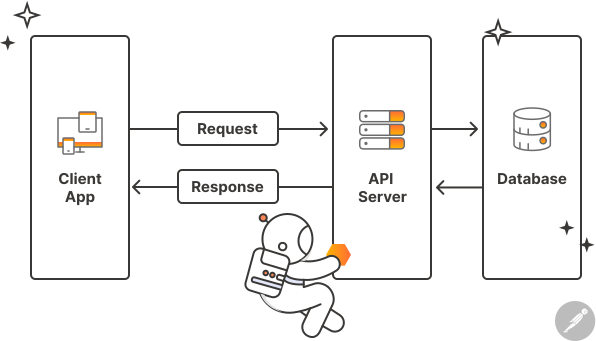
The sequence diagram shows:
-
The client app sends a
POST /api/ordersrequest to the API server. -
The API server communicates with the database to check inventory and create the order record.
-
The database returns data confirming the order details.
-
The API server sends a response back to the client app.
-
The client app displays an order confirmation to the user.
Using this diagram, new developers can visualize the full request–response loop of a checkout process and understand how data flows between the client, server, and database.
Microservices authentication (architecture diagram)
In a microservices architecture, an API gateway acts as the central entry point for all client requests. It handles authentication, routes traffic to the right services, and ensures consistent security across the system.
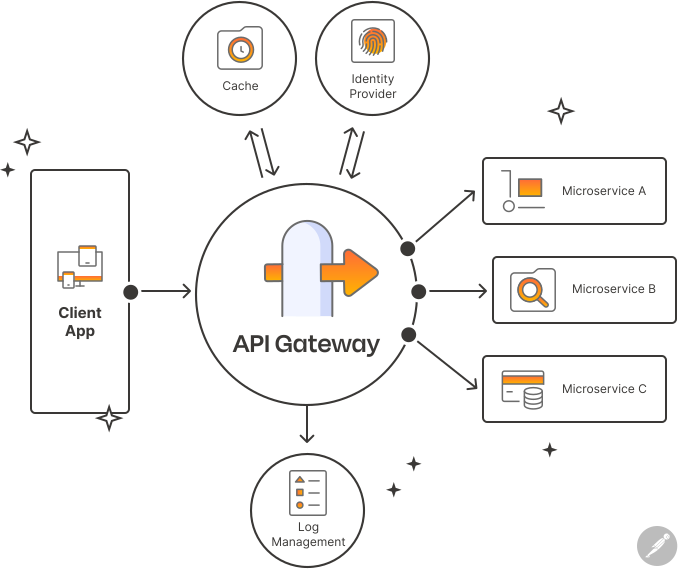
The architecture diagram shows:
-
A client app sends a login request to the API Gateway.
-
The API Gateway verifies credentials with an Identity Provider.
-
Once validated, the gateway issues or forwards a JWT (JSON Web Token).
-
The gateway routes requests to the correct microservice (such as Orders, Users, or Payments), each validating the token before processing.
-
A cache layer stores frequently accessed data to improve performance.
-
A log management system captures requests and responses for monitoring and debugging.
Using this diagram, teams can see how authentication is centralized at the gateway level, ensuring that each microservice remains secure, independent, and free from direct database coupling.
Payment resilience (error flow diagram)
When an API handles payment requests, it needs to respond predictably whether the operation succeeds or fails. An error flow diagram illustrates how the system manages these outcomes and keeps the process reliable.
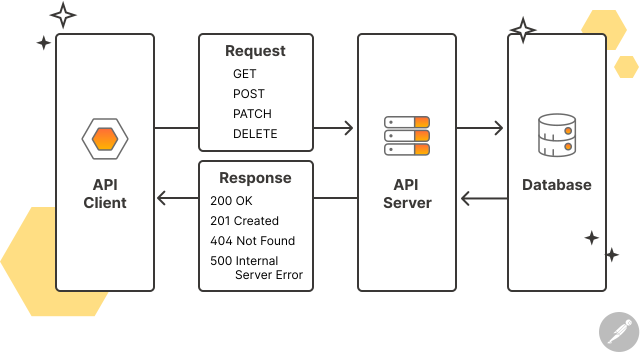
The error flow diagram shows:
-
The frontend sends a request using GET, POST, PATCH, or DELETE to the API server.
-
The API server communicates with the database to process the payment.
-
If the transaction succeeds, the API returns a
200 OKor201 Createdresponse. -
If the request is invalid or a record isn’t found, the API returns a
404 Not Founderror. -
If something goes wrong on the server or with an external provider, the API returns a
500 Internal Server Error.
Each response helps clients understand what happened and decide whether to retry, notify the user, or log the error. Using this diagram, developers can visualize how APIs surface different error states, design consistent retry strategies, and provide clear feedback to both systems and end users.
Testing your diagrams in Postman
Your diagrams should reflect reality. Postman helps validate accuracy by:
-
Creating collections from diagrams: Translate each step in sequence diagrams into requests, ordered to match the flow.
-
Using environment variables: Pass data between requests (user IDs, tokens) to confirm dependencies.
-
Adding tests: Verify responses match diagram specifications.
-
Testing error paths: Intentionally cause failures to verify error responses match error flow diagrams.
Quick workflow: Start with the happy path, test error scenarios, verify timing assumptions, and check authentication flows. If tests reveal discrepancies, update either your API or your diagrams—they should always match.
Common mistakes to avoid
| Mistake | Do instead |
|---|---|
| ❌ Overcrowded diagrams | ✅ Focus each diagram on one workflow, and then link them together. |
| ❌ Inconsistent terminology | ✅ Align terms across diagrams to prevent confusion. |
| ❌ Wrong audience focus | ✅ Tailor your diagram to include the details that matter most to your audience. |
| ❌ Outdated diagrams | ✅ Update diagrams as your API evolves. |
| ❌ Missing authentication and errors | ✅ Include authentication, security, and error handling details. |









What do you think about this topic? Tell us in a comment below.