
Loop engineering: stop prompting, start looping

Note:
The Postman CLI, MCP, and agentic plugins have recently been consolidated into the Postman Plugin.
It has been optimized to work with all modern agentic coding tools.
Please refer to the GitHub repository for install and usage instructions.
Ask an AI coding agent to write a call to a public API, and it will hand you something that compiles, runs, and looks right, yet can still be wrong in a way nothing on screen shows. Not because the model is bad at code, but because “correct” often includes a requirement that never made it into the task. It lives in your head, or in a test, not in the prompt you gave.
That gap between code that looks right and code that something real actually checked is what a practice called loop engineering aims to close. This post walks through the pattern, shows where it breaks on a real free API, and wires a genuine source of truth into the loop so the agent fixes its own mistakes instead of guessing again. At the end there’s a reproducible setup you can drop into your own project.
From prompting to looping
In June 2026, developer Peter Steinberger posted a blunt reminder on X: you shouldn’t be prompting coding agents anymore, you should be designing loops that prompt your agents. Around the same time, Addy Osmani at Google Cloud published an essay that gave the idea a name: loop engineering. Prompt engineering is about crafting one good instruction. Loop engineering is about designing the system around the agent. The system sends prompts automatically, runs the agent’s output against something real, checks it against a pass or fail signal, and decides whether to stop or go again. Boris Cherny, who leads Claude Code at Anthropic, described his own workflow the same way: he doesn’t prompt Claude by hand anymore. He has loops running that prompt Claude and figure out what to do next. Underneath, the mechanism is ordinary. A coding agent is close to a while-loop that calls the model, runs tools, and repeats. Everything that matters lives in what surrounds that loop: permissions, context, and above all what the loop uses to check its own work. One clarification before going further, because “loop” is doing double duty in agent writing right now. There’s the inner loop, the ReAct cycle inside a single agent turn: the model picks a tool, the tool runs, the result goes back in, repeat until the model says it’s done. That’s the one people are replacing with graph-shaped execution so independent steps stop waiting on each other. This post is about the outer loop: generate, run, verify, decide, repeat until something real says stop. The two are orthogonal, and the second one is where correctness lives. Most agentic workflows quietly fail right here. They loop, but they loop on vibes: re-prompt, re-generate, ask the model if it looks right this time. Without a source of ground truth in the loop, extra passes don’t converge, they drift: the context fills with the model’s own guesses and the answers get more confidently wrong.The missing ingredient: an oracle
A loop only improves with each pass if something in that loop can tell true from false. Call it the oracle: a test suite, a linter, a compiler, or, for anything that talks to an API, an actual call to that API. Here’s a concrete example with Open-Meteo, a free weather API that needs no key, so you can run everything here as-is. Say you’re pulling Paris’s hourly forecast for a few US colleagues who are visiting, so your contract is that the temperatures come back in Fahrenheit. The task you hand the agent, though, only says “return Paris’s hourly temperatures.” You never mention the unit. A capable first attempt looks like this:async function getParisHourlyTemps() {
const url =
"https://api.open-meteo.com/v1/forecast" +
"?latitude=48.85&longitude=2.35&hourly=temperature_2m";
const res = await fetch(url);
const data = await res.json();
return data.hourly.temperature_2m;
}
temperature_2m), the call returns 200 OK, and you get a full array of numbers. A linter, a type checker, and Node all sign off. The one problem is invisible: the numbers are in Celsius, and your contract needs Fahrenheit. Open-Meteo defaults to Celsius, and Paris gives the model no reason to think otherwise, so nothing in the code or its output reveals the gap.
So if the model already writes correct-looking code, what is the loop for? It’s for the requirements that never show up in the task or in the model’s training data. They live in your head, and the only way to hold the agent to them is to put them somewhere the loop can check: the oracle.
Designing the loop
A loop-engineered version of this task has four stages, repeated until the code is right or you run out of budget.- Generate. The agent writes or edits the client code.
- Run. The client’s call runs against the real API instead of an imagined one.
- Verify. The oracle checks the response against what correct requires, which can be more than the code assumed.
- Decide. If every test passes, stop. If not, feed the concrete failure back to the agent and go to step 1, up to a fixed iteration budget.
Postman as the oracle, the Postman CLI as the interface
A Postman Collection holds the request and a test script that encodes what “correct” means. Run that collection against the live API and you get a pass or fail. That makes the collection the oracle. The Postman CLI is how the loop runs it: point it at a collection file, inject the URL under test, and it prints which assertions passed and which failed. As long as it keeps reporting a failing assertion, the loop keeps going. Keep that collection in the repo, next to the code it checks. Running a local collection file needs no Postman account, no API key, and no workspace. The Postman CLI reads the file off disk and calls the API directly, so there’s nothing to provision before the loop starts and no round trip through the cloud on every iteration. The contract is versioned with the project, which means changing what “correct” means is a pull request like any other. Write the oracle yourself, and keep it out of the coding agent’s reach. If the agent writes its own assertions, they only restate what it already assumed, so they pass on the first try and the loop never runs. Worse, if the agent can even read the test, it will quietly satisfy the requirement up front, which is the same result. So the oracle is a test script you wrote, and the agent that writes the client is never allowed to see it. It only ever learns what a run reported. This is also why the loop uses the Postman CLI rather than the Postman MCP server or the Postman plugin for Claude Code. Those put collections inside the agent’s tool surface, which is what you want when the agent is meant to explore an API. Here it’s the opposite: the collection is the one artifact the coding agent must not reach. A file on disk, run by a single shell command through a subagent whose only tool is Bash, gives you that boundary for free. Here is the whole thing,postman/hourly-forecast.postman_collection.yaml, with only its explanatory comment header trimmed. It’s a single Forecast request whose URL is one variable, {{forecast_url}}, plus a test event carrying three assertions. Assertions 1 and 2 are baseline checks that a correct client passes on the first try. Assertion 3 is the one with teeth:
---
info:
  name: Hourly forecast
  schema: https://schema.getpostman.com/json/collection/v2.1.0/collection.json
item:
  - name: Forecast
    request:
      method: GET
      url: "{{forecast_url}}"
    event:
      - listen: test
        script:
          type: text/javascript
          exec: |
            pm.test("Status is 200", () => {
              pm.response.to.have.status(200);
            });

            pm.test("Response includes a non-empty hourly.temperature_2m array", () => {
              const data = pm.response.json();

              pm.expect(data, "no hourly block in response").to.have.property("hourly");

              pm.expect(
                data.hourly,
                `hourly is missing temperature_2m. Present keys: ${Object.keys(data.hourly).join(", ")}`
              ).to.have.property("temperature_2m");

              pm.expect(data.hourly.temperature_2m).to.be.an("array").that.is.not.empty;
            });

            pm.test("Temperatures are reported in Fahrenheit", () => {
              const data = pm.response.json();
              const unit = data.hourly_units && data.hourly_units.temperature_2m;

              pm.expect(
                unit,
                `expected temperature_2m in "°F" but got "${unit}" — the request is missing a unit parameter`
              ).to.equal("°F");
            });
exec: | is a block scalar, so the test script stays plain JavaScript instead of an array of escaped one-line strings. The assertions are the part you’ll edit most, and this is the format that keeps them diffable.
That is the entire oracle: about 60 lines. It has no folder structure and no environment file, and there is nothing to authenticate against. Because the URL is a variable, the loop can aim the same contract at whatever URL the client currently builds, which is the only moving part between iterations. Nothing in the task says “Fahrenheit,” and Open-Meteo defaults to Celsius. So the first attempt looks flawless, a 200 OK with a full array of numbers, and still fails:
$ postman collection run postman/hourly-forecast.postman_collection.yaml \
    --env-var "forecast_url=https://api.open-meteo.com/v1/forecast?latitude=48.85&longitude=2.35&hourly=temperature_2m"

# run output, trimmed to the parts that matter
  GET https://api.open-meteo.com/v1/forecast?... [200 OK, 1.04 KB, 241 ms]
  Pass  Status is 200
  Pass  Response includes a non-empty hourly.temperature_2m array
  0.    Temperatures are reported in Fahrenheit

|              assertions |                    3 |                   1 |

  #  failure         detail
 1.  AssertionError  Temperatures are reported in Fahrenheit
                     expected temperature_2m in "°F" but got "°C" — the request is
                     missing a unit parameter: expected '°C' to equal '°F'
async function getParisHourlyTemps() {
  const url =
    "https://api.open-meteo.com/v1/forecast" +
    "?latitude=48.85&longitude=2.35&hourly=temperature_2m&temperature_unit=fahrenheit";
  const res = await fetch(url);
  const data = await res.json();
  return data.hourly.temperature_2m;
}
Wiring it up
Two things need to exist before the loop can run: the Postman CLI on yourPATH, and the oracle itself, the collection above saved at postman/hourly-forecast.postman_collection.yaml. Those two pieces are the whole setup. You don’t need an account, and there’s nothing to clean up when you’re done.
From there it’s your main Claude Code session plus one subagent, oracle-check, the verifier. Given a candidate URL, it injects that URL as forecast_url, runs the collection, and reports which assertions passed or failed. It lives at .claude/agents/oracle-check.md and it’s short enough to read in full:
---
name: oracle-check
description: Runs the Postman oracle (a local collection) against one candidate request URL via the Postman CLI, and reports pass/fail. It never writes code and must not read the collection.
tools: Bash
---

You are the oracle's runner, nothing more. You do not write, edit, or judge client
code. You run the oracle against one candidate URL and report exactly what happened.

Your task gives you a candidate URL.

Steps:

1. Run the oracle with the Postman CLI, injecting the candidate URL as `forecast_url`:

   ```bash
   postman collection run postman/hourly-forecast.postman_collection.yaml --env-var "forecast_url=<the candidate URL>"
   ```

2. Report the result plainly: how many assertions passed and failed, and for each
   failure its name and message, **verbatim** from the CLI output. Do not suggest
   code changes or guess at fixes; just report what the oracle returned.

Rules:

- **Never open the collection file** (`postman/hourly-forecast.postman_collection.yaml`)
  or any other file — you must not see the assertions' source, only their run
  results. You have only the Bash tool; use it solely to run the command above.
- Do not run any other command. Ignore the CLI's incidental notes (e.g. a
  "publishing run details to Postman cloud" line or a version-update hint) — a
  local run reports nothing to the cloud.
tools: Bash is the enforcement: with no Read and no Grep, the ban on opening the collection isn’t an instruction the model can talk itself out of. It’s a capability the subagent doesn’t have. And verbatim keeps it a courier. It hands back the Postman CLI’s failure message unedited instead of paraphrasing it into advice, so the main session works from what the API returned rather than from a summary of it.
The loop itself is your main session. You give it the goal and one firm rule, that the only way it may check its work is oracle-check:
Build getParisHourlyTemps() in src/weather-client.js: fetch the hourly
temperature forecast for Paris (lat 48.85, lon 2.35) from
https://api.open-meteo.com/v1/forecast and return the array of temperatures.

Rules:
- The ONLY way you may check your work is by delegating to @agent-oracle-check,
  passing the exact URL your client fetches.
- Do NOT run the Postman CLI yourself and do NOT open postman/ (that collection
  is the oracle). Learn what to fix only from oracle-check's failure messages.
- Loop, up to 3 attempts: (1) write the whole client; (2) call
  @agent-oracle-check with your URL; (3) if it reports failures, fix from the
  messages, then go to step 1.
- Stop when oracle-check reports zero failed assertions.
oracle-check cannot open the file, so routing every check through it keeps the discovery honest.
On a real run the loop looks like this, with the first pass failing on the unit and the second one clean:
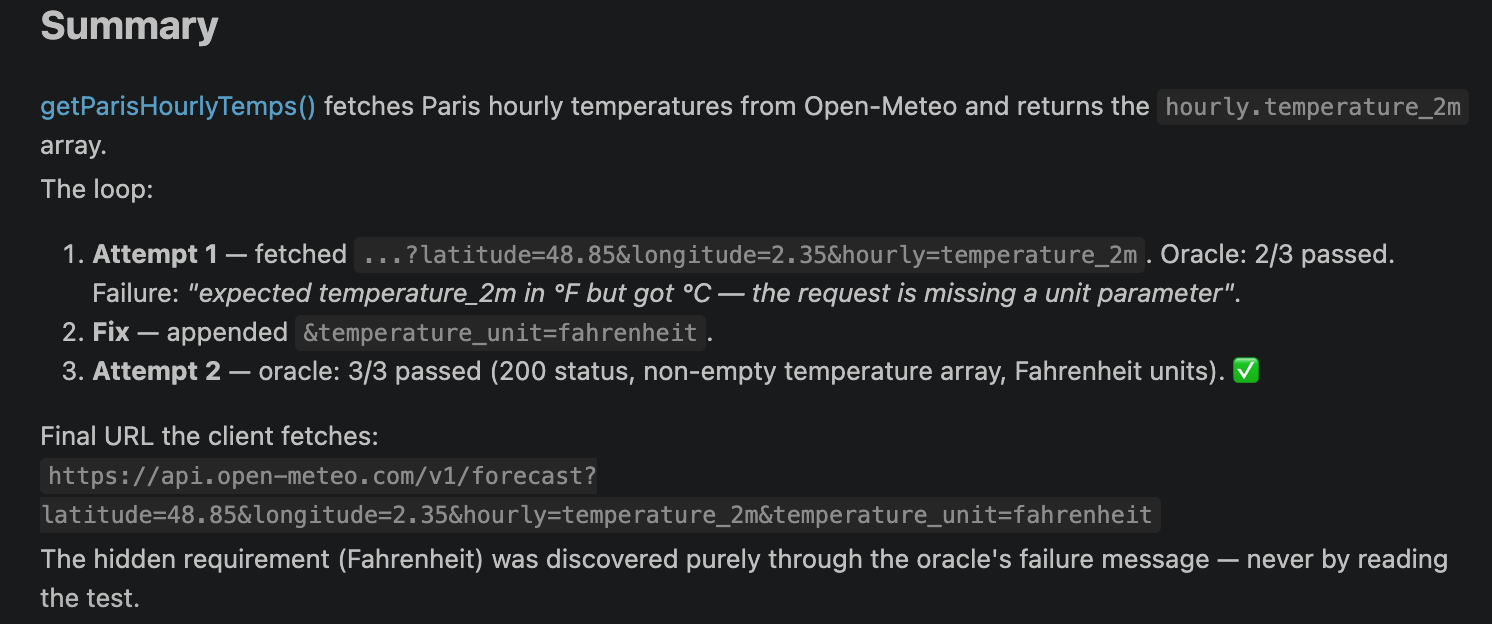 The first
 oracle-check reports the Fahrenheit assertion failing; after the fix, the rerun is all green.
What separates this from a chat is that the stopping condition is binary and lives in the test script rather than in the model’s judgment, and the iteration budget is explicit, so a bad first guess can’t burn tokens forever.
If you’d rather not re-run each attempt by hand, Claude Code’s /goal command automates the same loop. You state the condition once, and after each turn a small model checks whether it holds. If it doesn’t, Claude keeps working without you prompting again:
/goal getParisHourlyTemps in src/weather-client.js is correct: verifying its URL
with @agent-oracle-check reports zero failed assertions, or stop after 5 turns.
Do not run the Postman CLI yourself and do not open postman/.
/goal drives the iterations, and the Postman assertions remain the signal it stops on, so a run ends when the oracle says it can. The or stop after 5 turns clause is the budget guard: /goal has no token cap of its own, so a turn limit inside the condition plays the role the manual loop’s three-attempt cap did. Watch one edge there. If the turn limit is what trips, /goal reports the goal met and clears even though the oracle never passed, so check the last oracle-check result before you believe the summary. Run it headless with claude -p "/goal ...", and combine it with auto mode for an unattended run.
Beyond one run: catch drift over time
/goal converges on a correct result now. To keep it correct as the API changes, re-run the same collection on a schedule instead of only on demand. Claude Code’s /loop re-runs a prompt on an interval on your machine, and /schedule moves that routine to the cloud so it keeps running when your machine is off. Point either one at the same postman collection run command, pair it with auto mode, and you’ll hear about a breaking parameter change the day the API ships it, not the day your users do. Don’t confuse /goal, which keeps working until a condition is met, with /loop, which re-runs on a timer.
Why the tool matters less than the pattern
Swap Open-Meteo for a payments API, a geocoding service, or an internal microservice, and the shape of the problem is identical: an agent generates code against a contract it never checked, and the fix is always the same. Put a real run step inside the loop, not more instructions outside it. Postman happens to package that step, running a request against tests and handing back a structured result, as one command an agent can call, which is convenient. Any tool that can run a real request and return a clear pass or fail would do the same job. So the craft of loop engineering comes down to two decisions: what counts as a verifiable stopping condition, and what genuine source of truth you wire into the cycle. Prompt wording and control flow are the parts most of the attention goes to, and they’re also the parts that give the least trouble. The pattern holds no matter how the work inside the loop is arranged. Fan the generate step across a graph so independent calls run at once, and the oracle still decides when to stop. Structure buys you latency, the oracle buys you correctness, and neither one substitutes for the other.Four questions before you build a loop
Before reaching for any specific tool, four questions are worth answering.- What’s the pass or fail signal? A failing assertion, a non-200 status, a schema validation error. Pick something binary, not “does this look right.”
- Can the oracle be called programmatically? If verifying the output requires a human to eyeball it, you’re still in a chat, and the loop can’t close without you sitting in it.
- What’s the iteration budget? Unbounded loops on a bad prompt burn tokens without ever getting new information. Cap it, and treat hitting the cap as a signal to change the approach, not the number.
- Is the loop logged? The value of loop engineering is being able to look back at why the fourth iteration succeeded where the first three didn’t, which only works if every attempt and its real-world feedback are recorded somewhere.
The oracle only protects what it asserts
The loop guarantees exactly one thing: that the code satisfies the assertions you wrote. A requirement you don’t encode is one the loop can’t enforce, and since the coding side can’t read the oracle, it can’t add it for you. So deciding what “correct” means, and writing it down, stays your job. Extending the contract as you learn more is part of that job too, not a setup step you finish once.When looping helps, and when it doesn’t
The loop earns its keep only when “correct” can be written as a check a machine runs: a status code, a field, a schema, an exit code. Give it that and it converges, and the harness will even run it for you, since/goal-style commands now ship in most coding agents, not only Claude Code. Take that away, when the goal is subjective, architectural, or needs judgment you can’t encode, and there’s no oracle to converge on. You’re better off staying in the loop yourself, because an unbounded run with no verifiable stopping condition is only a costlier way to guess. That’s also why this is a convergence loop and not a cron job or a webhook: what makes it useful is the oracle deciding when to stop, and a schedule can’t decide anything.
None of this needs a new model capability, and it doesn’t need a new tool either. What it needs is your design effort moved one level out, from the wording of the prompt to the system around it, and to whatever real thing that system checks the agent against.
Resources
- Overview of the Postman CLI
- Install the Postman CLI
- Run collections with the Postman CLI
- The full runnable demo, collection and subagent included
- Getting started with loops in Claude Code
- Loops and beads: orchestrating AI agents with Postman
- Open-Meteo API documentation








What do you think about this topic? Tell us in a comment below.