
How AI Agents Discover and Integrate Public APIs

The hardest API to integrate is the one you cannot name.
You know exactly what the software needs to do: read a calendar, create an event, and send an email when the event is confirmed. What you do not know is which API exposes those capabilities, or whether one API can handle the entire workflow.
That turns discovery into a brute-force process. Every candidate becomes its own investigation: find the documentation, map the required capabilities to endpoints, inspect the authentication model, test the constraints, and determine what is missing. Most candidates fail only after you have already invested the time to understand them.
Search by intent, not by name
Orbit by Postman reverses that process. Instead of starting with an API name, you start with the task.
Describe what you want to build in plain language, and Orbit searches for public API endpoints that match the required capabilities. The result is not another list of documentation pages. Orbit returns callable endpoints with an evaluation of what each one supports, what it does not support, and how well it fits the task.
That distinction matters. “Calendar API” is a category. “Read events, create an event, and notify the attendee” is an executable workflow. Orbit evaluates APIs against the workflow rather than forcing the developer, or the agent, to infer capabilities from product names and documentation structure.
Once you select the endpoints, Orbit’s integration step generates a taskBrief containing the implementation details an agent needs: authentication, base URLs, request parameters, response shapes, execution order, and the gotchas most likely to break the integration. A single brief can include endpoints from multiple APIs, so the calendar and email portions do not need to come from the same provider. Orbit’s usage guide shows this flow across separate services.
Orbit can be used through its search and integration endpoints or connected to an AI agent through the Model Context Protocol (MCP). Either way, the shift is the same: the agent no longer searches the web, opens five documentation sets, and guesses which APIs fit.
It describes the outcome. Orbit finds the interfaces that can produce it.
The launch post has the full tour of both tools if you want to dive deeper.
The feature with no obvious API
My team is building a healthcare app: patient records, medication, appointments, and scheduling.
Booking already works. A patient picks a slot, we POST /api/appointments/, Postgres gets a record, and the service publishes an appointment.booked event. appointment-slots-service picks that event up and flips the slot to booked.
Nothing else happens. The clinician’s calendar never learns about the appointment, and the patient hears nothing from us after the booking screen. That causes two problems. A clinician who blocks time outside the app will get a patient booked over it, because our slots table can’t see that block. And a patient whose only record of the visit is a page they already closed has nothing reminding them to show up.
So the feature was clear enough: check the clinician’s calendar before we confirm a slot, write the appointment to that calendar, and email the patient. Three capabilities, and no idea whose API provided them.
That’s the question Orbit exists to answer, so I stopped guessing and handed the task to it.
Connecting the MCP server
First, I connected to the MCP server using Claude:
claude mcp add --transport http orbit https://mcp.buildwithorbit.ai/mcp
Then, I restarted my session so the schemas load, and the two tools show up as search and integrate:
search    Find and evaluate public API endpoints that match a plain-language
          goal. Describe what you need in `q`; each result includes `id`,
          `resourceType`, `name`, `description`, `method`, `url`, and
          `evaluateGuide`. Review `evaluateGuide` to pick the best fit, then
          pass each chosen result's `id` and `resourceType` (as `type`) to
          `integrate`. No authentication required.

integrate Get integration details for public endpoints from `search` results.
          Provide a `task` describing what you want to accomplish and up to 10
          `resources`. Returns a task brief covering authentication, base URLs,
          request steps, parameters, expected responses, dependencies between
          steps, and other important considerations.
Read the search description again, because it’s doing something clever. It tells the model to review evaluateGuide before choosing, and it names the exact field to carry into integrate. The chaining rule lives in the tool description rather than in my prompt, so the agent runs the two-step workflow without me explaining it. That’s the difference between an MCP server that wraps an API and one that encodes how the API is meant to be used.
Searching for an API I couldn’t name
I opened the GitHub repo locally, started Claude Code in it, and described the feature the way I’d describe it to a colleague:
> The appointments service publishes appointment.booked but nothing reaches the
  clinician's real calendar. Find me an API that can check whether a clinician
  is free before we confirm a slot.
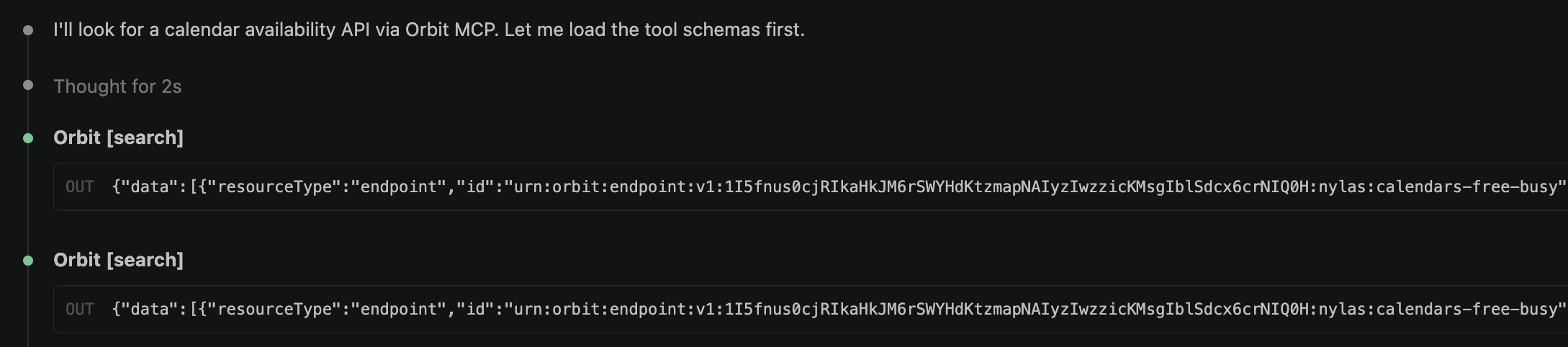
The same session, unedited. Two Orbit [search] calls, and the endpoint IDs coming back in the response.
Note what the agent did to my sentence. I described a product problem, and it sent calendar vocabulary. That translation is the thing that makes or breaks a search here.
What came back was the Nylas Calendar API, and two endpoints that answer subtly different versions of my question:
| Endpoint | Question it answers | Scope constraint |
|---|---|---|
POST /v3/grants/{grant_id}/calendars/free-busy |
“Is this clinician busy between T1 and T2?” Raw busy blocks, with no titles, locations, or descriptions. | Grant-scoped, and every email address has to be on the same provider: all Google or all Microsoft. |
POST /v3/calendars/availability |
“Which N-minute slots are open across these people?” | Application-scoped, and it only returns availability for addresses already connected to your Nylas app. |
I hadn’t gone looking for Nylas; the search surfaced it, which is the whole point. Both paths are scoped to a grant, which is one connected mailbox and calendar that a clinic authorizes once through OAuth. A Google clinic and a Microsoft clinic are the same code path with a different grant.
Integrating the API
Search hands you endpoints. integrate turns them into something an agent can write code against.
The call takes two things: the task, in the same plain language I used for search, and the endpoints I picked out of the results.
● orbit - integrate (MCP)
  task: "When a patient books an appointment slot in a healthcare app, read the
         clinician's calendar to check for conflicts, create a calendar event
         for the visit, and send the patient a confirmation email"
  resources:
    - id: urn:orbit:endpoint:v1:1JfnSC668Gw0xjByXOjgh0EA8G3qVd4A…:nylas:return-all-events
      type: endpoint
    - id: urn:orbit:endpoint:v1:1JfnSC668Gw0xcUnlXP6gVtFBZ6Qk8nL…:nylas:create-an-event
      type: endpoint
    - id: urn:orbit:endpoint:v1:1JfnSC668Gw0yW6A9NI5lL7NJrnkapSj…:nylas:send-a-message
      type: endpoint
What comes back is one taskBrief under five headings: FIT, AUTH, BASE URL, STEPS, and GOTCHAS. The middle two are one line each, and both are things I’d otherwise go find in a docs site:
AUTH
  Bearer authentication for all steps. Send the Nylas API key as
  `Authorization: Bearer <bearerToken>`; the collection references
  {{bearerToken}}, but does not provide its value.

BASE URL
  https://api.us.nylas.com for all steps.
STEPS is the bulk of the brief. Each step gets its method and path, every parameter with the place it goes, and an example value. It ends with the success and error response shapes and a Threading line saying what the step takes from the one before it:
1. GET /v3/grants/{grant_id}/events
   Params:
     calendar_id: string — e.g. `cal_123`; query parameter, required by the
       supplied URL.
     grant_id: string — e.g. `grant_123`; path variable.
     limit: integer — `50`; query parameter, up to 200.
     Optional conflict filters: `page_token`, `start` and `end`,
       `show_cancelled`, `busy`, `title`, `description`, `location`, …
   Returns:
     200 OK; `data[]` containing events and a `request_id`. Errors include 400
     with `request_id` and `error` (`type`, `message`, `provider_error`), or
     401 with the same error shape.
   Threading:
     None
The brief told me what would break
The two sections I didn’t expect to be useful were FIT and GOTCHAS. Here is the FIT section of the brief, verbatim as Orbit returned it:
FIT
  Fully. The supplied requests cover calendar conflict checking, event
  creation, and confirmation-email sending. They are related by the
  appointment task but do not consume a value returned by another request,
  so each request is described in order without fabricated response threading.
Read that FIT section closely. It says the three requests don’t consume each other’s return values, so it declines to invent threading between them. A generated guide that refuses to fabricate a dependency chain beats one that produces plausible glue code, because plausible glue code is what I debug later.
Further down the same brief, the event-creation step handed me the body shape directly:
2. POST /v3/grants/{grant_id}/events
   Params:
     grant_id: string — e.g. 'grant_123' (path)
     calendar_id: string — e.g. 'cal_123' or 'primary' (query)
     JSON body:
       title: string — 'Patient appointment'
       busy: boolean — true
       visibility: string — 'private'
       participants: array of objects
       when: object — {"start_time":1690862400,"end_time":1690866000,
                       "start_timezone":"America/New_York",
                       "end_timezone":"America/New_York"}
       reminders: object — {"use_default":false,"overrides":[...]}
And then the GOTCHAS section, again verbatim, which is the part I’d normally learn from a failed request:
GOTCHAS
  - Use epoch seconds and the specified timezone fields in the event's
    when object.
  - The event and email calls are separate mutations; do not retry either
    blindly. Use a unique Idempotency-Key for safe email retries.
  - Some event fields may be null, including busy, calendar_id, when,
    reminders.use_default, and reminders.overrides.
  - Check all relevant event pages and compare the requested appointment
    interval with returned event timing before creating the event; use
    page_token for subsequent pages.
Three steps, the auth and base URL, plus the gotchas above: that’s the entire integration spec, and all of it arrived before I’d opened a browser tab.
So why not skip all of this and tell the agent “integrate Nylas v3 for me”? I’d get code. It would look right. The difference is where the details come from: my brief was generated against the Nylas v3 collection on the Postman API Network, the same indexed source the search matched. A model working without that is working from whatever it absorbed about Nylas during training, and the four things that broke my integration are exactly the things recall gets wrong:
- Formats.
when.start_timeis epoch seconds. Nothing about a JSON booking payload suggests that, and ISO-8601 is the confident guess. - Nullability.
busycan come back null and meanstrue. Guessfalseand you double-book a clinician. - Retry semantics. The
Idempotency-Keyheader on the send call is the difference between a retry and a patient getting two confirmation emails. - Dependencies.
Threading: Noneon all three steps is a claim, not a blank, andFITsays it again in prose. The brief looked for values passed between the calls, found none, and said so. Ask a model to wire up three endpoints and it will thread them instead, because plausible beats absent and chained calls are what integration code looks like.
I still had to write the consumer. What I didn’t have to do was learn any of this from a 400.
Writing the feature from the brief
This is the part the whole search was for. The brief named the three calls, their bodies, and their failure modes, so what was left was deciding where in our app to put them. I didn’t have to compare providers or dig through documentation. I had to wire three known requests into a service that already existed.
The platform already publishes domain events over Kafka, so I didn’t touch the appointments service at all. appointment-slots-service shows the pattern, subscribing to the same topic to flip slot state.
Calendar sync is another consumer on that topic. Keeping it out of the booking request path means a Nylas outage delays a confirmation email instead of failing a patient’s booking, which is the tradeoff I want.
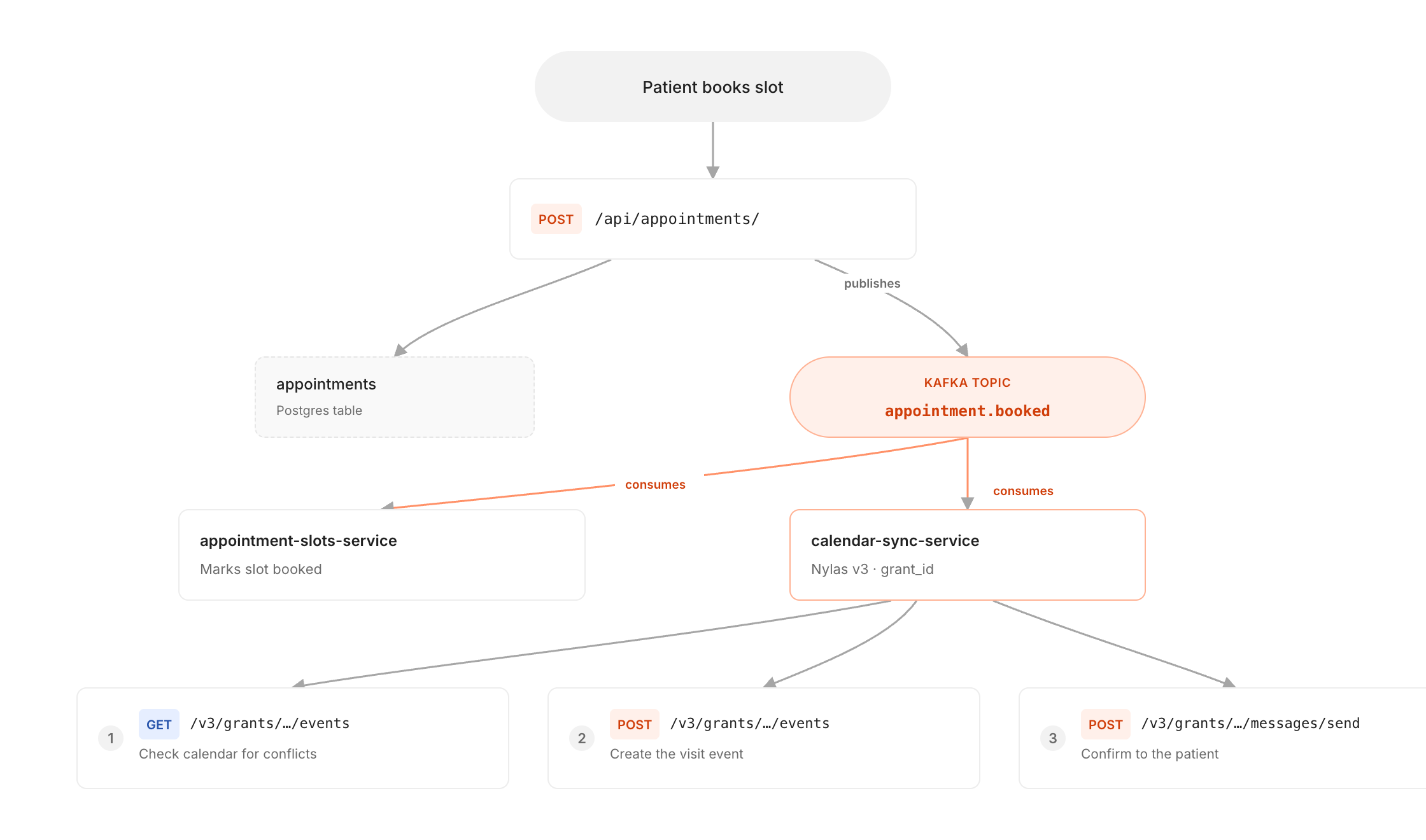
The three numbered calls run in the order the task brief listed them.
Everything is in healthcare-calendar-sync if you want to read it end to end, including the test suite that asserts the brief’s gotchas against a faked Postgres, Kafka, and Nylas.
One stop before you point any of this at a real mailbox. Nylas publishes its v3 collection on the Postman API Network, the same collection Orbit indexed to answer my search. Fork it into your workspace and every request from the task brief is ready to send. That’s the cheapest place to check the epoch-second format and the idempotency header, before a patient is on the other end of them.
What I’d tell the next person
- Name the mechanism, not the feature. “Create a calendar event for a booked appointment” could pull back a school calendar system or an integration platform, because “calendar event” and “appointment” match anything carrying those nouns. “Find available free busy time slots before booking a meeting” returned the API I needed three times over. So look at what the endpoints are before anything else: results from unrelated domains mean your query was too generic, not that the API doesn’t exist. And don’t read
meta.totalas a match count. It reports the size of the page you asked for. - Read
GOTCHASbefore you write the client. Epoch seconds, nullablebusy, and theIdempotency-Keyheader were all sitting in the brief. Each one is a bug I’d otherwise have shipped and then heard about from a support ticket. - The most useful line is the one about what an endpoint won’t do. “Not supported” in
evaluateGuideis the highest-value part of the search response. Nylas has separate endpoints for creating a draft and sending it, and the guide says so in the search result instead of making me find out from a 400.
The week I didn’t spend
The integration itself is unremarkable: one Kafka consumer, three HTTP calls, and a thin client around them. What Orbit compressed was everything before that, where I knew the shape of the feature but not the name of the API.
search pointed me at an API that had been built for my task. integrate gave me the request bodies, the epoch-second format, the nullable field that would have caused double-bookings, and the idempotency header that keeps patients from getting duplicate mail. That last set is the part I value, because those are the failures that surface in production rather than in review.
Try it on something you’re stuck on. One command:
claude mcp add --transport http orbit https://mcp.buildwithorbit.ai/mcp
Then take a feature you’ve been putting off because you don’t know what to integrate with, and describe it in one sentence:
> We need to <the capability you're missing>. Search Orbit for an API that
  does it, show me the evaluateGuide for the top results, then get the
  integration brief for whichever ones you'd pick.
Read the evaluateGuide lines before you open a docs site, and read GOTCHAS before you write the client. Those two habits are what turned a week of provider comparison into an afternoon of writing a consumer. Then tell me whether the brief caught something you’d have shipped, because I’d like to know if my three were typical.
Resources
- Introducing Orbit: Turn Any Task Into the Right API Calls, the launch post
- Orbit documentation and the usage guide
- Orbit search endpoint reference and integrate endpoint reference
- Orbit OpenAPI specification
- Nylas v3 collection on the Postman API Network
- healthcare-calendar-sync, the complete service from this post
- myhealthcare.dev API reference and appointments service repo








What do you think about this topic? Tell us in a comment below.