
Structure, govern, and collaborate at scale with Postman Organizations

Postman recently rolled out Organizations, a new set of features designed to allow Enterprise plan customers to set up multiple Teams under the umbrella of what we call an Organization. The hierarchical structure now spans Organizations > Teams > Workspaces. This additional layer allows users to scale, govern and collaborate more effectively.
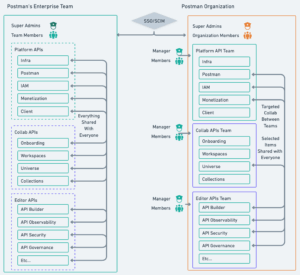
When we first enabled Postman Organizations internally, our existing setup reflected what many enterprises start with: all users and resources living in a single, flat structure. Doing security wherther it be network or data security in a flat structure is impossible. Our team based model lets “least privilege” shine.
To roll it out we needed to do it in a structured way that wouldn’t break as the organization grows.
Our recommended best practice for customers is to use User Groups (and SCIM, where available) to manage team membership at scale. Groups provide a centralized, repeatable way to keep access aligned as teams and roles change, without manual intervention.
If you couldn’t use User Groups, you could use a CSV file to map users to their respective Teams and assign manager or member roles. Postman’s Collection Runner could parse the CSV and apply those assignments programmatically. Once Teams are established, Team Managers move their workspaces into the appropriate Teams and begin managing membership going forward using standard organization controls. Of course, this creates a manual process dependent on a large number of individuals, which quickly becomes onerous.
This approach reinforces why User Groups are the preferred approach for ongoing membership management: they reduce operational overhead, scale more cleanly, and keep team access aligned as organizations evolve.
Feel free to leverage this template as internal communications tools for your environment:
From: <key executive in charge or regular IT/Security comms channel>
To: <all Postman users>
Subject: Postman Organizations Roll Out
Body:
Postman Users:
We are excited to roll out a new feature of Postman called Organizations on <DATE>.
Currently, all users at <COMPANY> are on the same Postman instance. We are now able to reflect our own company structure. This will allow us to dial in permissions and settings more granularly, provide audit logs when needed, and more. We will automatically transfer your Workspace and Team to the correct Organization; there is no action needed from you at this time. If you have any questions or find an issue that needs attention, please contact <PROCESS.>
While we initially focused on fast adoption and less on governance, a key insight is that it is really important to have your Okta SCIM management set up in advance of such a project; otherwise, the manual work required to transfer users, workspaces, and teams would be daunting.
As a Security team, we’re thrilled with the centralized control, structured team collaboration, and stronger security and governance this model enables. Audit logs allow us to see who accessed what and when, helping us better control data and ensure it’s shared only with those who need access. With fewer people in each specific structure, teams can maintain tighter controls. Additionally, administrators can better assess their needs and customize settings per team, rather than conforming to broader organizational requirements that often necessitate lower security barriers. This brings the best practice concepts of Zero Trust and least privilege to the application layer.
We also appreciate the reduced burden around permissioning and user management. By using SCIM groups, permissions are automatically applied to new users and removed when users are deactivated.
Overall, this has been a significant improvement to our security posture, and we encourage other teams to adopt this capability.